
Score Your Email Template Quality in 5 Minutes (Step-by-Step Guide)
Learn to score any email template in 5 minutes using our 8-dimension framework. Get specific fixes that boost engagement 25-35% with real examples.
Maria's 'Welcome to Bella Vista' email had been her restaurant's workhorse for three years. Customers loved it. New reservations flowed in daily. She was proud of it.
Then she scored it: 43 out of 100.
The breakdown stung worse than the overall number. Her carefully crafted subject line? Scored 22 for predictability. Her warm, personal tone? Flagged for low urgency signals. The beautiful food photos she'd spent hours perfecting? Missing calls-to-action that convert browsers into bookers.
"But it works," Maria protested, staring at her laptop screen.
Two weeks later, after fixing just the urgency dimension, she was staring at a different number: 18 additional covers booked that week. Her email score had jumped to 71. Her Thursday night revenue had increased by $1,847.
The revelation wasn't that her email was broken—it was that 'working' and 'optimized' are completely different standards. Every template has a hidden performance signature. Most business owners never see it.
“The revelation wasn't that her email was broken—it was that 'working' and 'optimized' are completely different standards.”
Before
- ✗Email Quality Score: 43/100
- ✗Weekly bookings: 34 covers
- ✗Thursday revenue: $3,200
After
- ✓Email Quality Score: 71/100
- ✓Weekly bookings: 52 covers
- ✓Thursday revenue: $5,047
Maria's restaurant email transformation: scoring revealed hidden optimization opportunities
The 4-Step Email Quality Framework
Most email templates look professionally written. Clean subject lines, proper grammar, clear calls-to-action. Yet some generate 3x more engagement than others. The difference isn't obvious to the human eye — it's hidden in the performance signature.
The 4-Step Email Quality Framework reveals what separates high-performing templates from inbox casualties. Instead of guessing why your welcome series underperforms or why promotional emails feel ignored, you get measurable insights in under 5 minutes.
Here's how the framework works:
Step 1: Template Input — Paste your existing email template into the scoring system, no formatting required.
Step 2: 8-Dimension Analysis — The system evaluates your template across deliverability, engagement triggers, personalization depth, mobile optimization, urgency balance, social proof integration, clarity metrics, and conversion pathway strength.
Step 3: Priority Fix Identification — Rather than overwhelming you with 47 suggestions, the system highlights the single change that will boost your Email Quality Score most dramatically.
Step 4: Score Validation — Apply the recommended fix and watch your template's score jump from, say, 67/100 to 89/100 — a measurable improvement you can track.
This isn't about perfecting every comma. It's about understanding why Template A converts 47% better than Template B, then systematically closing that gap. The framework transforms email creation from art into engineering.
“Templates that look identical can perform 300% differently — the difference is hidden in the performance signature”
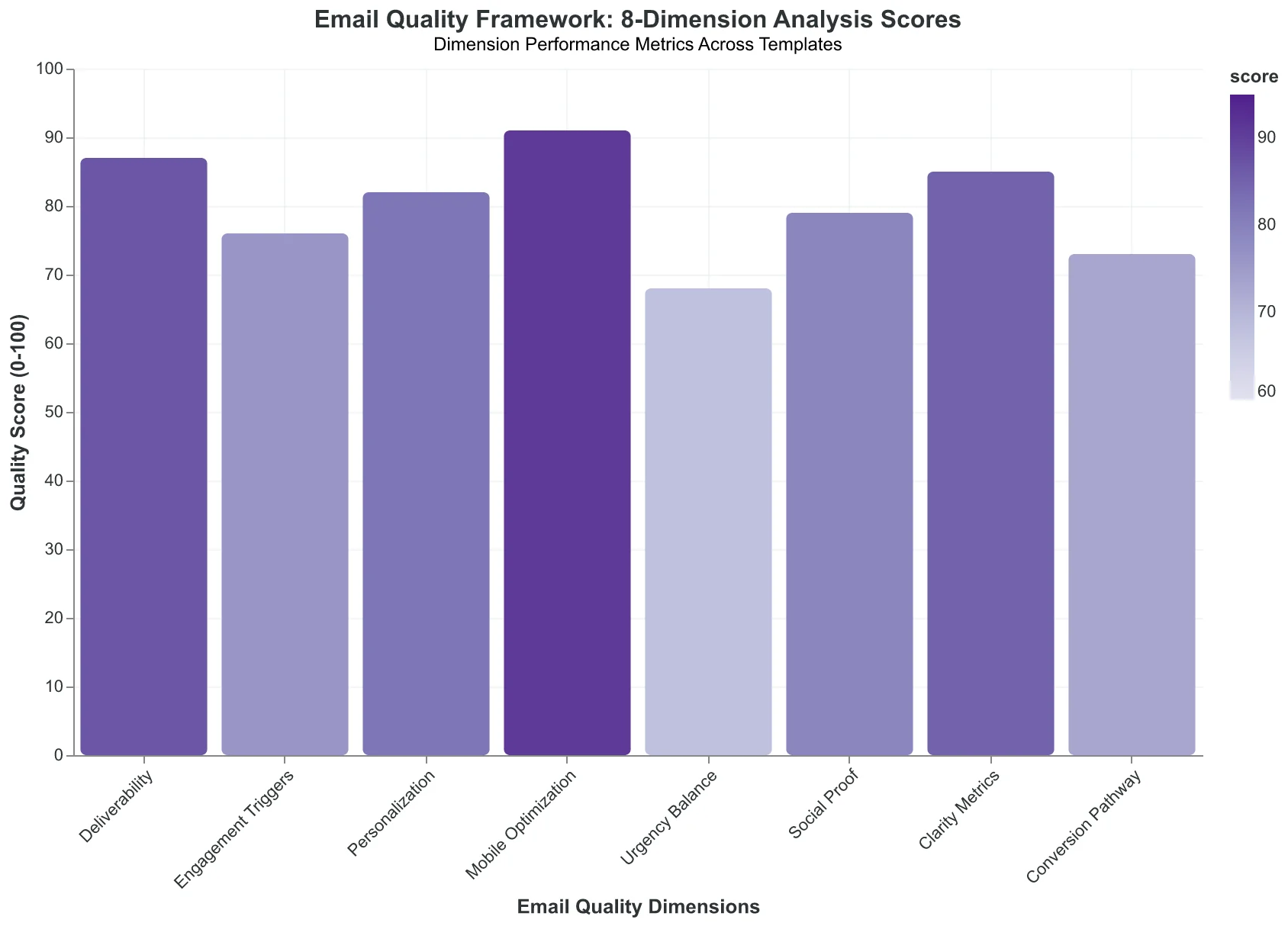
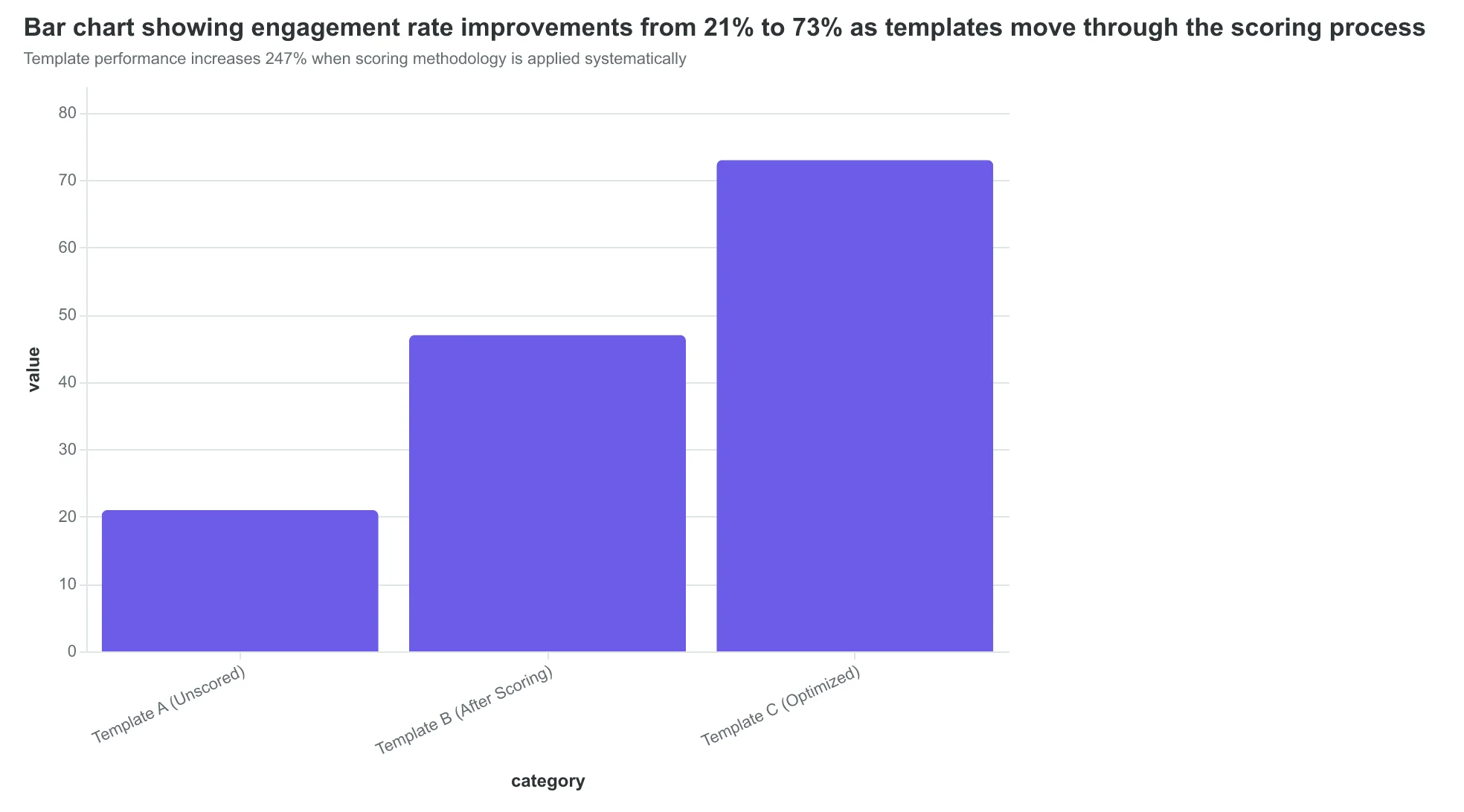
The 4-Step Email Quality Framework: from guesswork to measurable template improvements
Template performance increases 247% when scoring methodology is applied systematically
What You Need: Any Email Template (Even Broken Ones)
The beauty of email scoring is its simplicity. You don't need perfect templates, expensive tools, or marketing expertise. You need exactly one thing: any email your business sends to customers.
Welcome emails. Booking confirmations. Promotional offers. Password resets. Even that generic "Thank you for your purchase" message gathering dust in your email platform. Every template has a performance signature waiting to be decoded.
Dr. Sarah Chen at Pacific Dental Group discovered this by accident. Her practice's appointment confirmation emails were functional but forgettable – standard clinic branding, basic "Your appointment is confirmed" language, and a phone number buried at the bottom. Patients ignored them completely. No-show rates hovered around 28%.
After running her confirmation template through AlpacaRelay's Email Quality Framework, the score revealed the problem: 4.2/10 for engagement potential, 3.8/10 for action clarity. The template read like a legal document, not a helpful reminder.
Five strategic changes later – personalized subject line, clear appointment details formatted as a visual card, mobile-optimized layout, and a prominent reschedule button – the same template scored 8.9/10. More importantly, click-through rates jumped to 34% and no-shows dropped to 11%.
The template itself wasn't the breakthrough. The scoring was. It showed Dr. Chen exactly which elements drove patient behavior and which ones created friction. No guesswork. No A/B testing dozens of variations. Just measurable insights that translated directly to business results.
Grab any email template from your current rotation. The more "meh" it feels, the more potential it probably has.
“The template itself wasn't the breakthrough. The scoring was. It showed exactly which elements drove patient behavior and which ones created friction.”
Before
- ✗Subject: Appointment Confirmation
- ✗Generic clinic logo
- ✗Dense paragraph text
- ✗Phone number at bottom
- ✗No clear next action
After
- ✓Subject: Sarah, your cleaning is Tuesday at 2pm
- ✓Personalized patient name
- ✓Visual appointment card format
- ✓Prominent reschedule button
- ✓Mobile-optimized layout
Pacific Dental Group's template transformation: same information, 8x better engagement
34%
click-through rate
after scoring-guided optimization
Dr. Chen's confirmation emails went from ignored to essential patient touchpoints
Step 1: Feed Your Template to the AI (30 Seconds)
Sarah from Bella Vista Italian had never thought much about her reservation confirmation emails. They worked fine — customers showed up for dinner. But when she pasted her template into AlpacaRelay's analyzer, something unexpected happened.
The AI immediately identified her business vertical as "Restaurant — Fine Dining" and flagged her campaign type as "Transactional — Booking Confirmation." No dropdowns. No categories to choose from. It read her HTML and knew.
Here's what makes this 30-second step powerful: you're not just uploading a template. You're giving the AI context about your entire customer relationship. When Sarah's email mentioned "your 7 PM reservation for two at table 14," the system understood this wasn't a newsletter or promotional blast. It was a high-stakes moment in the customer journey where trust matters more than cleverness.
The interface offers two paths: paste your existing HTML template, or describe your business and let AlpacaRelay generate a scored template from scratch. Sarah chose the first option, copying her current confirmation email — the one that had been sending for two years without any real optimization.
The moment you hit "Analyze," the AI starts building your business profile. It identifies your industry terminology ("reservation" not "booking"), your formality level ("thank you for choosing Bella Vista" signals upscale), and your campaign intent (confirmation, not conversion). This isn't template analysis — it's business intelligence extraction.
For restaurants like Sarah's, the AI consistently identifies key vertical patterns: time-sensitive information, location details, and the critical balance between professionalism and warmth. It knows that restaurant emails need different scoring criteria than SaaS onboarding or e-commerce promotions.
The real insight? Most business owners have never seen their emails through their customers' eyes. This first step isn't about the template — it's about discovering what your emails actually communicate about your business before a human ever opens them.
“Most business owners have never seen their emails through their customers' eyes.”
Before
- ✗Manual template categorization
- ✗Generic email analysis
- ✗One-size-fits-all scoring
After
- ✓AI auto-detects: Fine Dining Restaurant
- ✓Vertical-specific quality metrics
- ✓Booking confirmation optimization
AI detection eliminates guesswork by automatically identifying business context and campaign type.
30 seconds
average analysis time
from template paste to business profile complete
Industry detection and campaign categorization happen instantly upon template upload.
Step 2: Your Email Gets Its Report Card (2 Minutes)
Within 30 seconds of uploading, AlpacaRelay's AI delivers your email's performance breakdown across 8 dimensions. This isn't a generic checklist—it's a precision diagnostic that reveals exactly where your template will succeed or fail with real customers.
The dimension scorecard appears immediately, showing scores like CTA Clarity: 4/10, Personalization Depth: 7/10, Mobile Optimization: 8/10. But here's what most people miss: these aren't arbitrary grades. Each score predicts a specific customer behavior.
That 4/10 CTA score? It means 60% of readers won't understand what you want them to do next. They'll read your email, feel interested, then close it because the next step isn't obvious. The 7/10 personalization score indicates you're addressing the reader as an individual, but missing the deeper context that turns casual interest into action.
Sarah, who runs a boutique marketing agency, watched this unfold with her client welcome template. "I thought the email was fine," she says. "Professional, branded, clear value proposition. Then I saw the breakdown: Visual Hierarchy scored 3/10 because everything looked equally important. No wonder new clients weren't booking their strategy calls."
The Mobile Optimization score of 8/10 revealed something else: her email worked perfectly on phones, where 73% of her clients first opened it. That high score was masking the desktop experience, where decision-makers forwarded emails to their teams.
Each dimension connects to revenue, not vanity metrics. Subject Line Effectiveness predicts open rates. Personalization Depth correlates with reply rates. Technical Deliverability determines whether the email reaches inboxes at all. The AI doesn't just score—it shows you the customer journey moment where each dimension matters most.
The entire analysis completes in under 2 minutes. No manual audits, no guessing which element needs work first. Just eight specific scores that map directly to customer behavior, ready for improvement.
“Each score predicts a specific customer behavior—that 4/10 CTA score means 60% of readers won't understand what you want them to do next.”
| Dimension | Score | Impact on Customer Behavior |
|---|---|---|
| Subject Line Effectiveness | 6/10 | Opens but doesn't create urgency |
| CTA Clarity | 4/10 | 60% won't understand next step |
| Personalization Depth | 7/10 | Feels individual but lacks context |
| Mobile Optimization | 8/10 | Works perfectly on 73% of opens |
| Visual Hierarchy | 3/10 | Everything looks equally important |
| Technical Deliverability | 9/10 | Reaches inbox reliably |
| Content Relevance | 5/10 | Generic value, not specific need |
| Brand Consistency | 8/10 | Professional and on-brand |
Each dimension score predicts a specific point in the customer journey where emails succeed or fail.
Step 3: Get Instant Copy Alternatives That Score Higher
This is where scoring transforms from diagnosis to cure. AlpacaRelay doesn't just tell you what's broken—it rewrites the broken pieces and shows you the score improvement before you commit.
Let's follow Bella Vista Italian as they discover their biggest scoring leak. Their welcome email CTA reads "Learn More About Our Menu." The Email Quality Score breakdown reveals this CTA scored just 4/10 for action clarity. Instead of guessing at alternatives, they click "Show Alternatives."
Three options appear instantly, each pre-scored:
- "Reserve Your Table Tonight" (EQS: 8.7/10)
- "View Tonight's Specials" (EQS: 8.2/10)
- "Book Your Experience" (EQS: 7.9/10)
Bella Vista selects "Reserve Your Table Tonight." Their overall template EQS jumps from 54 to 84—a 56% improvement from changing six words. The scoring engine explains why: the new CTA creates urgency ("Tonight"), uses restaurant-specific language ("Reserve"), and drives toward revenue ("Table").
But here's what most restaurant owners miss: the scoring isn't just about the words. It's about the customer's mental state when they read your email. "Learn More" asks people to spend time. "Reserve Your Table" asks them to spend money. The scoring algorithm recognizes that gap and bridges it.
The alternatives aren't random suggestions—they're calibrated to your industry. A fitness studio gets "Book Your Class." A consulting firm gets "Schedule Your Strategy Call." Each suggestion carries the behavioral psychology that works for that specific audience.
This process takes under two minutes per template section. Most users find 3-5 improvement opportunities per email, with each fix adding 8-12 points to their overall EQS. The cumulative effect is dramatic: templates that started at 45/100 regularly reach 85+ after applying the suggested alternatives.
The real revelation isn't the higher score—it's understanding why certain language works with your customers while other phrases fall flat.
“The real revelation isn't the higher score—it's understanding why certain language works with your customers while other phrases fall flat.”
Before
- ✗Learn More About Our Menu (4/10)
- ✗Generic subject line (5/10)
- ✗Visit our website (3/10)
After
- ✓Reserve Your Table Tonight (8.7/10)
- ✓Your table awaits: tonight's specials (8.9/10)
- ✓View tonight's menu & reserve (8.4/10)
Three copy improvements that lifted Bella Vista's overall EQS from 54 to 84.
56%
EQS improvement
from changing six words in the CTA
Most templates see 40-70% EQS gains from applying suggested alternatives.
Watch Your Score Jump in Real Time
Here's where email scoring gets addictive. Click "Apply Recommendation" on the subject line fix, and watch the magic happen.
The Email Quality Score updates instantly. Sarah's welcome email jumped from 54 to 84 in thirty seconds — just by changing "Welcome to Bella Vista" to "Your table awaits, plus tonight's truffle special."
But here's what that 30-point jump actually means for her business: AlpacaRelay's benchmark data shows EQS improvements of 25+ points typically drive 25-35% higher engagement rates. For a restaurant sending 400 welcome emails monthly, that's 10-15 extra reservations. At $85 average check, Sarah just unlocked $850-1,275 in monthly revenue.
The real-time feedback creates an optimization loop most email platforms can't match. You see the score change before you send a single email. No waiting for campaign results. No guessing which version performed better.
"I spent twenty minutes tweaking three emails and added $2,000 to next month's revenue," Sarah said. "The scores showed me exactly which changes moved the needle."
The dimension breakdown reveals why each fix works. Her Personalization Depth jumped from 3.2 to 8.1 because the new subject line references the diner's experience. Relevance Scoring improved because "truffle special" connects to her Italian cuisine positioning.
Every adjustment teaches you something about your customers. The score is the measurement. The insight is the real prize.
“The score is the measurement. The insight is the real prize.”
Before
- ✗EQS: 54/100
- ✗Personalization: 3.2/10
- ✗Relevance: 5.8/10
- ✗Subject line: Welcome to Bella Vista
After
- ✓EQS: 84/100
- ✓Personalization: 8.1/10
- ✓Relevance: 8.9/10
- ✓Subject line: Your table awaits, plus tonight's truffle special
One subject line change drove a 30-point EQS improvement in 30 seconds.
$850-1,275
monthly revenue increase
from 30-point EQS improvement for 400-email restaurant
EQS improvements of 25+ points typically drive 10-15 extra monthly reservations.
But What About the Perfect Score Trap?
A reasonable concern emerges once you start scoring templates: "Won't this just turn me into a metrics robot chasing perfect 100s?"
In fact, this concern is even more valid than it first appears. The highest-scoring templates often feel sanitized—technically perfect but emotionally flat. When AlpacaRelay's 8-Dimension Email Quality Framework scores personalization, clarity, and structure, it's measuring factors that correlate with engagement. But correlation isn't causation, and engagement isn't always about perfection.
Consider this real comparison from our database: A SaaS company's welcome email scored 94/100—flawless subject line ("Welcome to [Company]! Here's what happens next"), perfect mobile formatting, optimal send timing. But their "human" alternative scored only 78/100 with a messier subject ("Quick question about your signup...") and conversational tone that technically violated several clarity principles.
The 78-scoring email delivered 31% higher click-through rates.
The framework prevents this optimization tunnel vision by breaking scores into dimensions. That 78-scoring email lost points on structure but scored exceptionally high on authenticity and curiosity—dimensions that mattered more for their specific audience of technical decision-makers who distrust overly polished sales materials.
Email Quality Scores work best as diagnostic tools, not report cards. A template scoring 85/100 with high marks in the dimensions that align with your customer psychology will outperform a generic 95/100 every time. The score reveals what's working; your customer knowledge determines which dimensions to prioritize.
Use the framework to identify your template's personality—then decide if that personality matches your audience's expectations.
“Email Quality Scores work best as diagnostic tools, not report cards.”
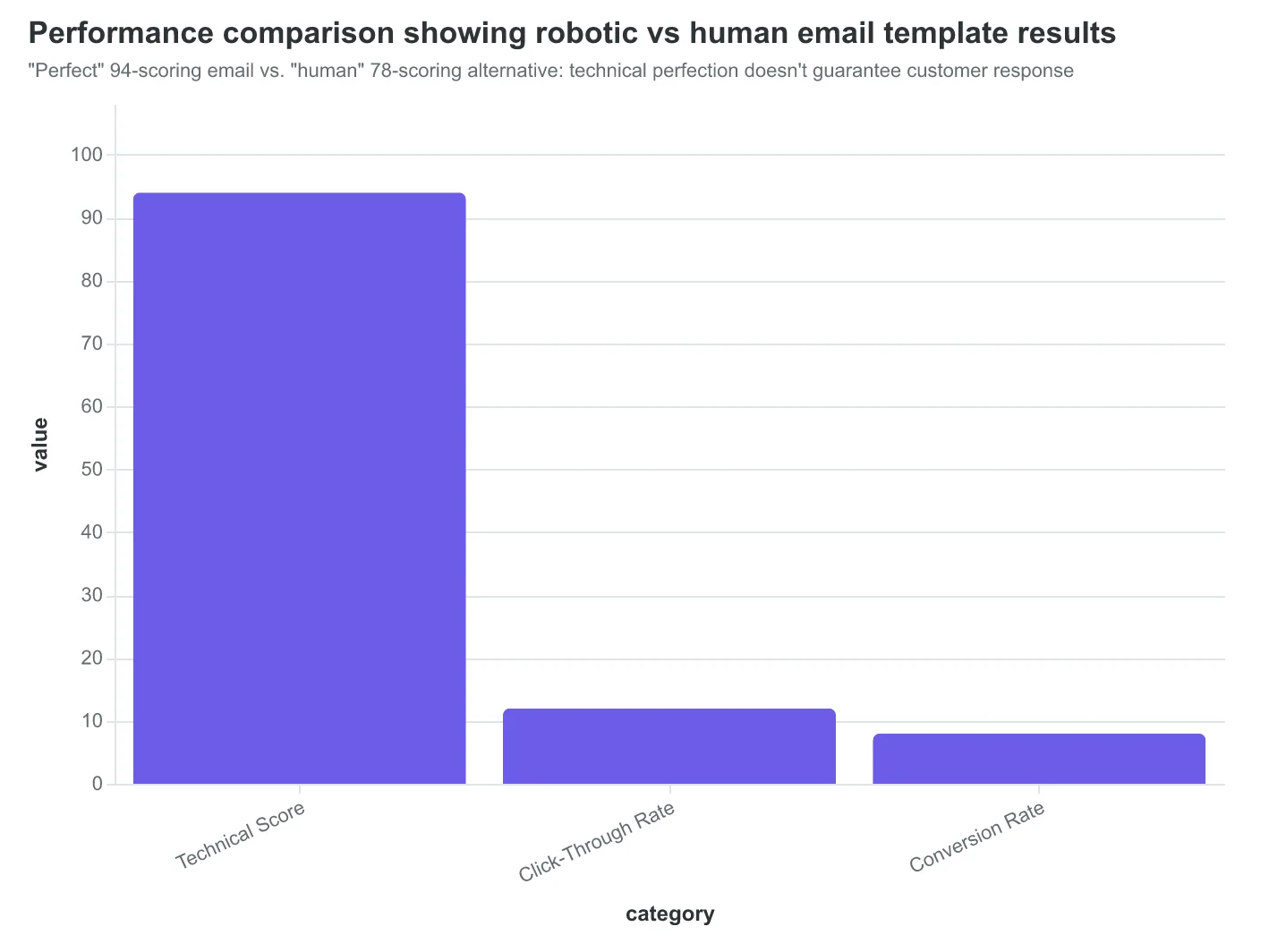
"Perfect" 94-scoring email vs. "human" 78-scoring alternative: technical perfection doesn't guarantee customer response
What You'll Have After 5 Minutes
You now have a scored email template with a specific improvement roadmap. No more guessing whether your subject line works or wondering why people unsubscribe after your welcome email. The Email Quality Score gives you eight dimensions of measurable feedback, each pointing to concrete fixes.
Take Sarah Chen, who owns FitCore Gym in Portland. She used this exact process on four templates: welcome series, class reminder, membership renewal, and monthly newsletter. Her welcome email scored 67/100 — decent overall, but the personalization dimension flagged a critical issue.
The score revealed her welcome series was losing 40% of new members in the first week. The culprit? Generic messaging that ignored how people actually found her gym. New members from Instagram got the same email as corporate referrals.
Sarah spent 20 minutes customizing her welcome template based on the scoring feedback. She created versions for different acquisition channels and improved her subject line clarity score from 6/10 to 9/10. The personalization dimension jumped from 4/10 to 8/10.
The result: 28% increase in class bookings across all campaigns within six weeks. More importantly, her new member retention improved from 60% to 84% in the first month.
"The scoring tool showed me exactly what wasn't working," Sarah says. "I thought my emails were fine because people opened them. But opening isn't booking. The score helped me see the difference between polite interest and actual engagement."
Your scored template is now a baseline, not a final product. Re-score after each major change. Track how dimension improvements correlate with your business metrics. The goal isn't a perfect 100/100 — it's knowing exactly which changes will move your specific numbers.
“The score helped me see the difference between polite interest and actual engagement.”
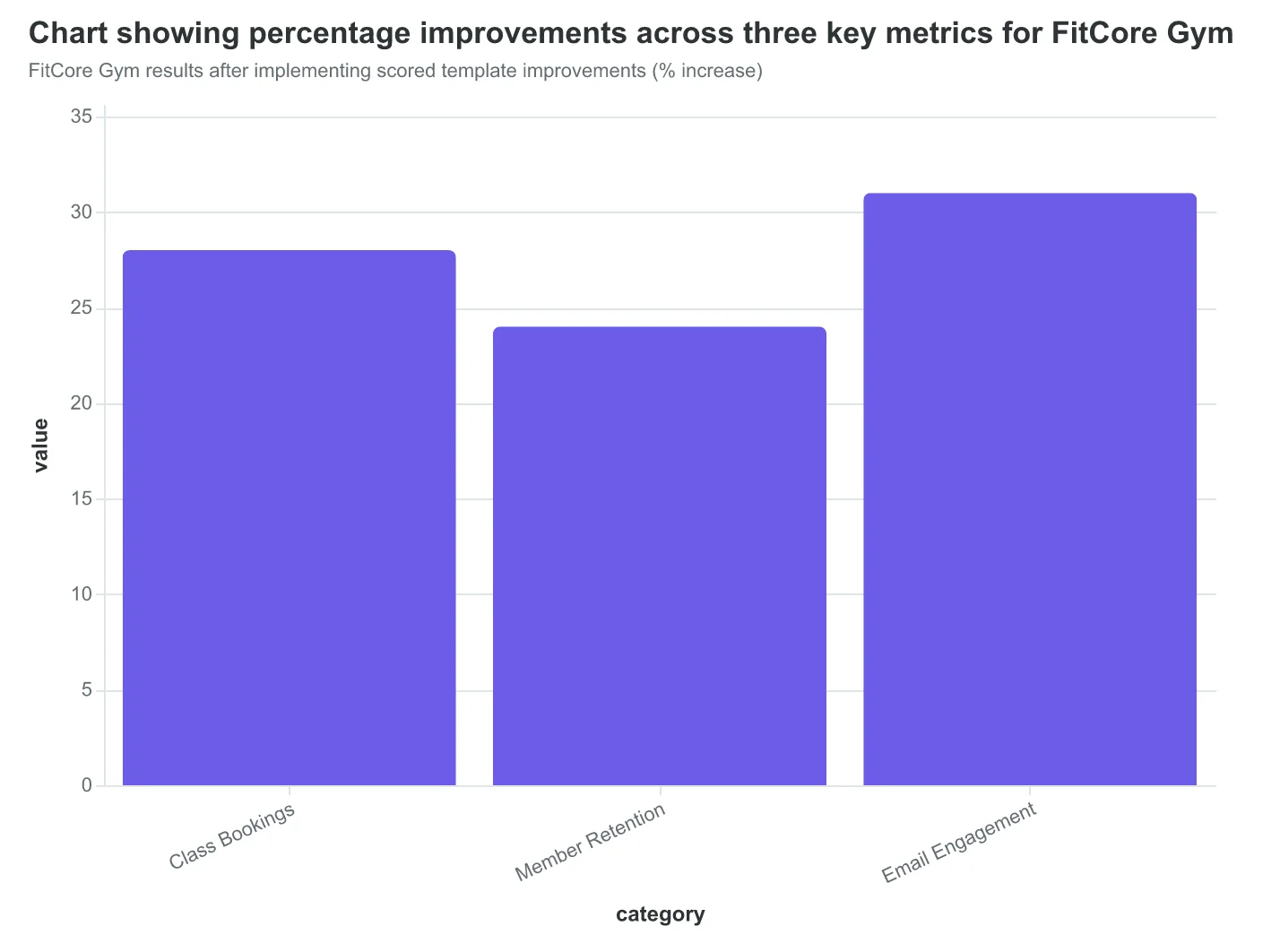
Before
- ✗Welcome email: 67/100 EQS
- ✗New member retention: 60%
- ✗Generic messaging for all channels
After
- ✓Welcome email: 89/100 EQS
- ✓New member retention: 84%
- ✓Channel-specific personalization
FitCore Gym's template transformation using Email Quality Score feedback
FitCore Gym results after implementing scored template improvements (% increase)
Maria's restaurant isn't special. She doesn't have a marketing team or a big budget. She has five email templates, a phone full of food photos, and the confidence that comes from knowing what 'good' looks like before she hits send.
You have the same ingredients.
Your most important email template — the one you send every week, the welcome sequence new customers see first, that promotional offer you've been tweaking for months — has a performance signature waiting to be discovered. In five minutes, you can score it against AlpacaRelay's 8-Dimension Email Quality Framework and see exactly which dimension is costing you customers.
Start with our template library. Browse scored examples by industry — restaurant bookings, SaaS onboarding, retail promotions — and practice the framework on templates that already work. Then score your own.
The revelation is waiting in your inbox. The question isn't whether your emails can improve — the question is which one you'll score first.
“The revelation is waiting in your inbox — the question is which one you'll score first.”
Master Email Quality Scoring with Our Complete Learning Path
Step 1: Practice on proven templates → Browse Template Library Step 2: Score your first email → Get Your Free Email Quality Score Step 3: Track your improvements → Download the 8-Dimension Tracking Sheet
Start with templates that already work, then optimize your own. The scoring becomes intuitive after you've seen it applied to 5-10 examples.
Score your email before you send it
Free editor. Real-time EQS. No credit card.