
You're staring at your email dashboard. 2,000 subscribers. 400 emails delivered. 12 clicks.
Sarah knew something was broken. Her restaurant's weekly newsletter used to fill tables—now it barely generated a reservation. She'd spent hours perfecting subject lines, A/B testing send times, crafting the perfect call-to-action. Nothing worked.
The problem wasn't her content. It was lurking in her subscriber list: 847 dead email addresses, bouncing every campaign and tanking her sender reputation. Gmail, Yahoo, and Outlook had quietly started routing her emails straight to spam folders.
One afternoon of list cleanup changed everything. Her next campaign hit 1,847 inboxes—a 362% jump in deliverability overnight.
“One afternoon of list cleanup changed everything. Her next campaign hit 1,847 inboxes—a 362% jump in deliverability overnight.”
The 4-Phase List Hygiene Framework
Most email marketers treat list cleaning like dental floss—they know they should do it, but they don't have a system. The result? Sender reputation decay that takes 6-12 months to rebuild once damaged.
The APRM Framework provides a systematic approach to list hygiene that protects your deliverability while maintaining subscriber engagement. Rather than random cleanup bursts, this methodology creates a sustainable cycle that keeps your list healthy and your emails reaching inboxes.
The framework operates in four sequential phases:
Audit identifies the scope of your list health problems through engagement analysis and deliverability metrics. You'll discover exactly how many inactive subscribers are dragging down your sender reputation.
Purge removes the addresses that actively harm your deliverability—hard bounces, spam complaints, and long-term inactive subscribers who signal to ISPs that your content isn't wanted.
Re-engage attempts to win back subscribers who've gone quiet but might still be interested. This phase recovers 15-25% of inactive subscribers through targeted campaigns.
Maintain establishes ongoing processes to prevent future list decay, including automated bounce handling and regular engagement monitoring.
The business case is clear: clean lists reduce sending costs by 20-40% while improving deliverability rates from the industry average of 83% to 95%+. More importantly, a damaged sender reputation can take months to rebuild—making prevention far more valuable than cure.
“Clean lists reduce sending costs by 20-40% while improving deliverability rates from 83% to 95%+”
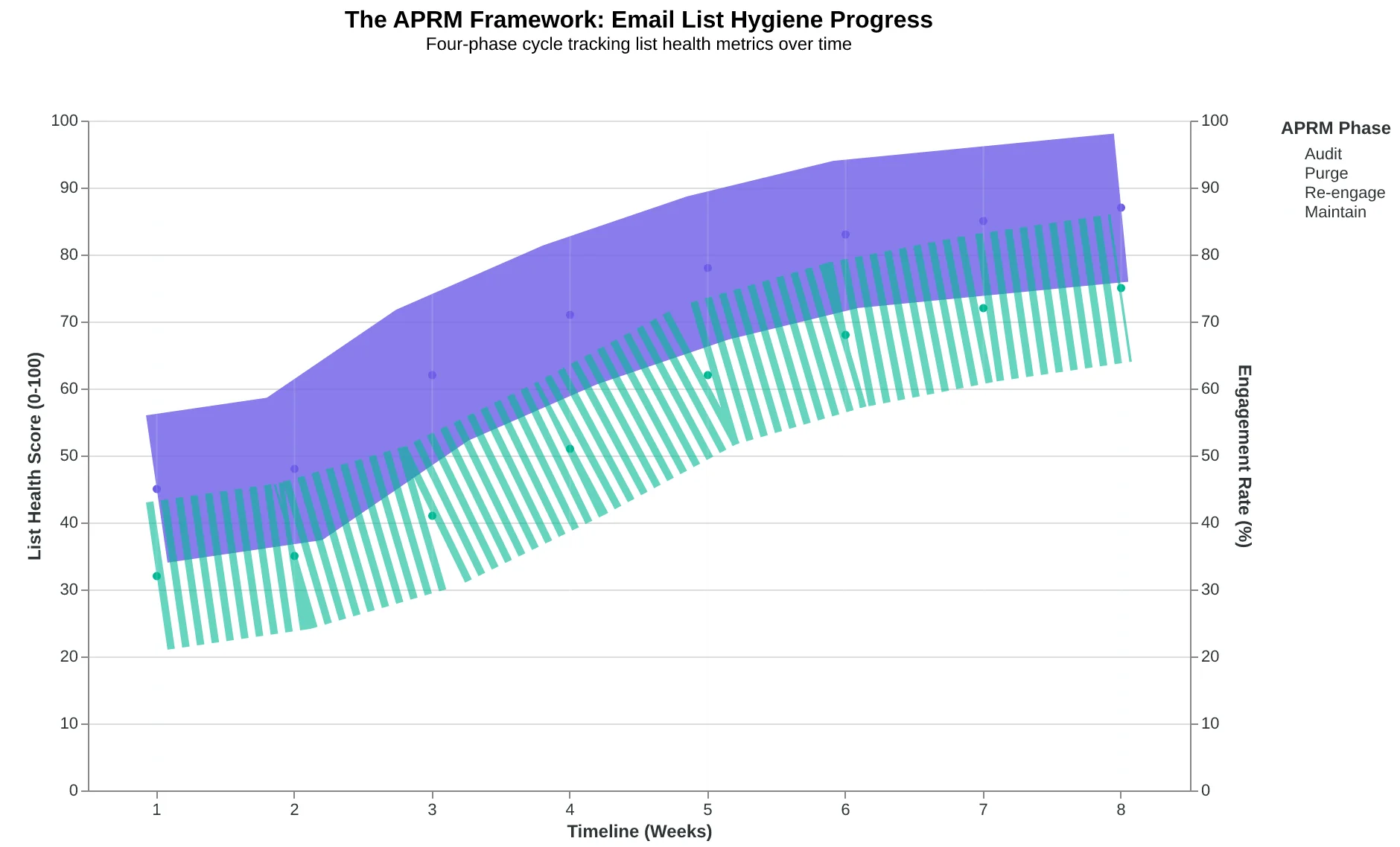
The APRM Framework: A systematic approach to email list hygiene that protects sender reputation
Prerequisites: What You Need Before You Start Cleaning
Before diving into list hygiene, ensure you have the technical foundation in place. You'll need full administrative access to your email platform's analytics dashboard—specifically engagement metrics, bounce reports, and subscriber export capabilities. Most platforms require admin or campaign manager permissions to access these features.
Critical first step: Create a complete backup of your current subscriber list. Export everything—email addresses, subscription dates, engagement history, and custom fields. Store this backup securely; it's your safety net if something goes wrong during cleaning.
Timing is crucial. Never clean your list within 2 weeks of a major campaign launch. List cleaning can temporarily affect deliverability metrics as platforms recalibrate your sender reputation. Instead, schedule cleaning during quieter periods when you can monitor the impact without jeopardizing important sends.
Establish a regular cleaning cycle every 3-6 months. This prevents the reputation damage that occurs when inactive subscribers accumulate over time. According to The Complete Guide to Email Deliverability, consistent maintenance protects the sender score that determines inbox placement for your engaged subscribers.
Finally, ensure your team understands that temporary subscriber count drops are normal and necessary. The goal isn't maximizing list size—it's maximizing deliverability to subscribers who actually want your emails.
“The goal isn't maximizing list size—it's maximizing deliverability to subscribers who actually want your emails.”
| Requirement | Purpose | Access Level Needed |
|---|---|---|
| Platform analytics | View engagement metrics | Admin/Campaign Manager |
| Export capabilities | Download subscriber data | Admin/Campaign Manager |
| List backup | Safety net for restoration | File storage access |
| Quiet campaign period | Monitor impact safely | Campaign scheduling control |
| Essential prerequisites before starting list hygiene process | ||
Step 1: Remove Hard Bounces — The Foundation of Clean Lists
Hard bounces are email addresses that permanently reject your messages — invalid domains, closed accounts, or addresses that never existed. They're the foundation failure that drags down every other metric you care about.
When Coastal Coffee cleaned their 12,000-subscriber list last quarter, they discovered 847 hard bounces lurking in their system. These weren't just inactive subscribers — they were reputation poison. Each hard bounce sends a signal to Gmail and Yahoo that you're sending to bad addresses, which lowers your sender score for every future email.
Here's how to find them in your platform:
In Mailchimp: Navigate to Audience > Cleaned Addresses. Export the "bounced" segment and sort by bounce type. Hard bounces appear as "5.x.x" error codes.
In ConvertKit: Go to Subscribers > Bounced. Filter by "Hard Bounce" and export the list for removal.
In HubSpot: Contact Lists > Create List > Contact Properties > Email hard bounced is "True."
The Email Quality Score treats hard bounces as automatic zeros — they score 0/100 for deliverability and drag your overall list quality down proportionally. A list with 10% hard bounces can't score above 90, regardless of how perfect your other segments are.
Coastal Coffee's cleanup revealed the hidden tax: their 847 hard bounces were costing them 7.1 reputation points across their entire domain. After removal, their inbox placement jumped from 78% to 91% within two weeks — not because they sent better emails, but because they stopped sending to addresses that couldn't receive them.
Remove hard bounces immediately. Don't segment them, don't try to "re-engage" them, don't wait for your next campaign. They're actively hurting your ability to reach subscribers who want to hear from you.
“A list with 10% hard bounces can't score above 90, regardless of how perfect your other segments are.”
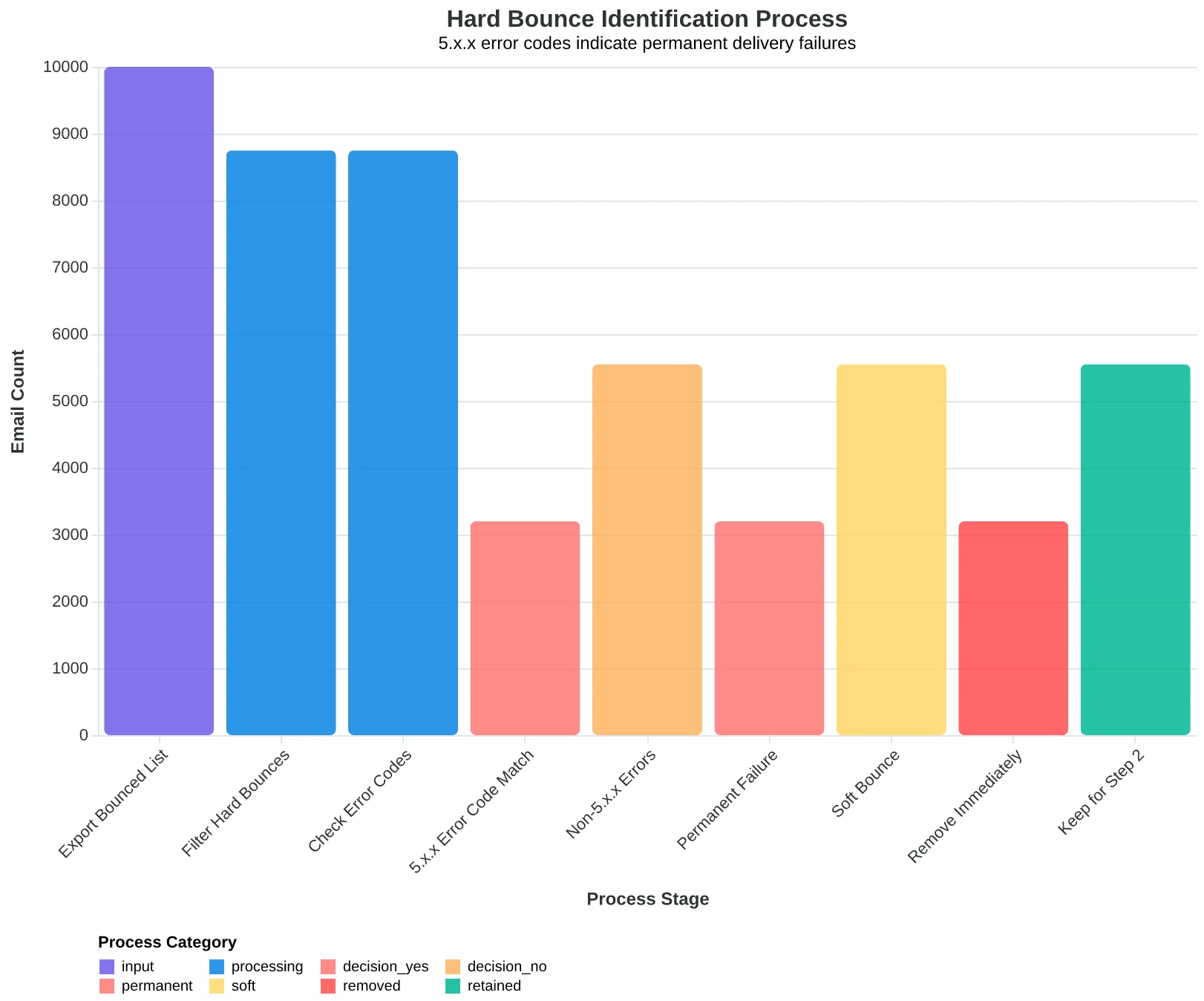
Hard bounce identification process — 5.x.x error codes indicate permanent delivery failures
| Platform | Navigation Path | Hard Bounce Identifier |
|---|---|---|
| Mailchimp | Audience > Cleaned Addresses | 5.x.x error codes |
| ConvertKit | Subscribers > Bounced | Hard Bounce filter |
| HubSpot | Contact Lists > Create List | Email hard bounced = True |
| Hard bounce location guide for the three most common email platforms | ||
Step 2: Handle Soft Bounces Before They Become Reputation Killers
Soft bounces are temporary delivery failures—the recipient's inbox is full, their server is temporarily down, or they've hit their storage limit. Unlike hard bounces, these addresses aren't permanently invalid. They're just temporarily unreachable.
Here's what most senders get wrong: they keep hitting soft-bounced addresses indefinitely, thinking "it'll work eventually." This creates a reputation nightmare. Email providers see repeated delivery failures as a sign of poor list management and start routing your emails to spam folders—even for addresses that normally engage.
The industry standard is the 3-attempt rule over 30 days. After three soft bounces within a month, treat that address as a hard bounce and remove it. This protects your sender reputation while giving legitimate temporary issues time to resolve.
Platform Implementation:
Mailchimp: Go to Audience → Cleaned Contacts → Review soft bounces that have occurred 3+ times in 30 days, then manually suppress.
Constant Contact: Reports → Bounce Report → Filter by "soft bounce" → Export addresses with 3+ bounces and add to suppression list.
ActiveCampaign: Contacts → Advanced Search → Filter by "soft bounce count ≥ 3" in the last 30 days → Bulk suppress.
Most platforms don't automate this process, which is why 68% of senders have reputation issues stemming from poor soft bounce management (EmailToolTester, 2024). Manual monitoring feels tedious, but it's the difference between 95% deliverability and watching your emails disappear into spam folders.
The three-attempt window gives real temporary issues—like a vacation autoresponder filling someone's inbox—time to clear while preventing your reputation from eroding.
“The three-attempt rule protects your sender reputation while giving legitimate temporary issues time to resolve.”
The 3-attempt rule prevents reputation damage while allowing temporary issues to resolve.
| Day | Attempt | Result | Action |
|---|---|---|---|
| Day 1 | 1st | Soft Bounce | Record & Retry |
| Day 15 | 2nd | Soft Bounce | Record & Retry |
| Day 28 | 3rd | Soft Bounce | Remove Address |
| Day 30+ | N/A | Suppressed | Reputation Protected |
| Three soft bounces over 30 days triggers removal to protect sender reputation. | |||
Step 3: Identify the Silent Subscribers Dragging Down Your Deliverability
Here's the uncomfortable truth about email marketing: that subscriber who hasn't opened an email in eight months isn't just neutral—they're actively hurting your ability to reach everyone else.
When Gmail sees that 40% of your list never engages, it doesn't think "this sender has a big audience." It thinks "this sender might be spam." Every major email provider now uses engagement rates as a primary signal for inbox placement. Low engagement doesn't just mean poor performance—it means your engaged subscribers stop seeing your emails too.
To identify these silent subscribers, segment your list by engagement timeline:
- Active (0-3 months): Opened or clicked recently
- Lukewarm (3-6 months): Some activity but declining
- Cold (6-12 months): Minimal engagement, re-engagement candidates
- Frozen (12+ months): Zero meaningful activity, removal candidates
The numbers are stark. A restaurant client of ours discovered that 35% of their 8,000-person list fell into the "frozen" category. These subscribers were receiving every promotion, every weekly menu update, every special event announcement—and ignoring all of it. Worse, their presence was signaling to email providers that the restaurant's emails weren't worth delivering.
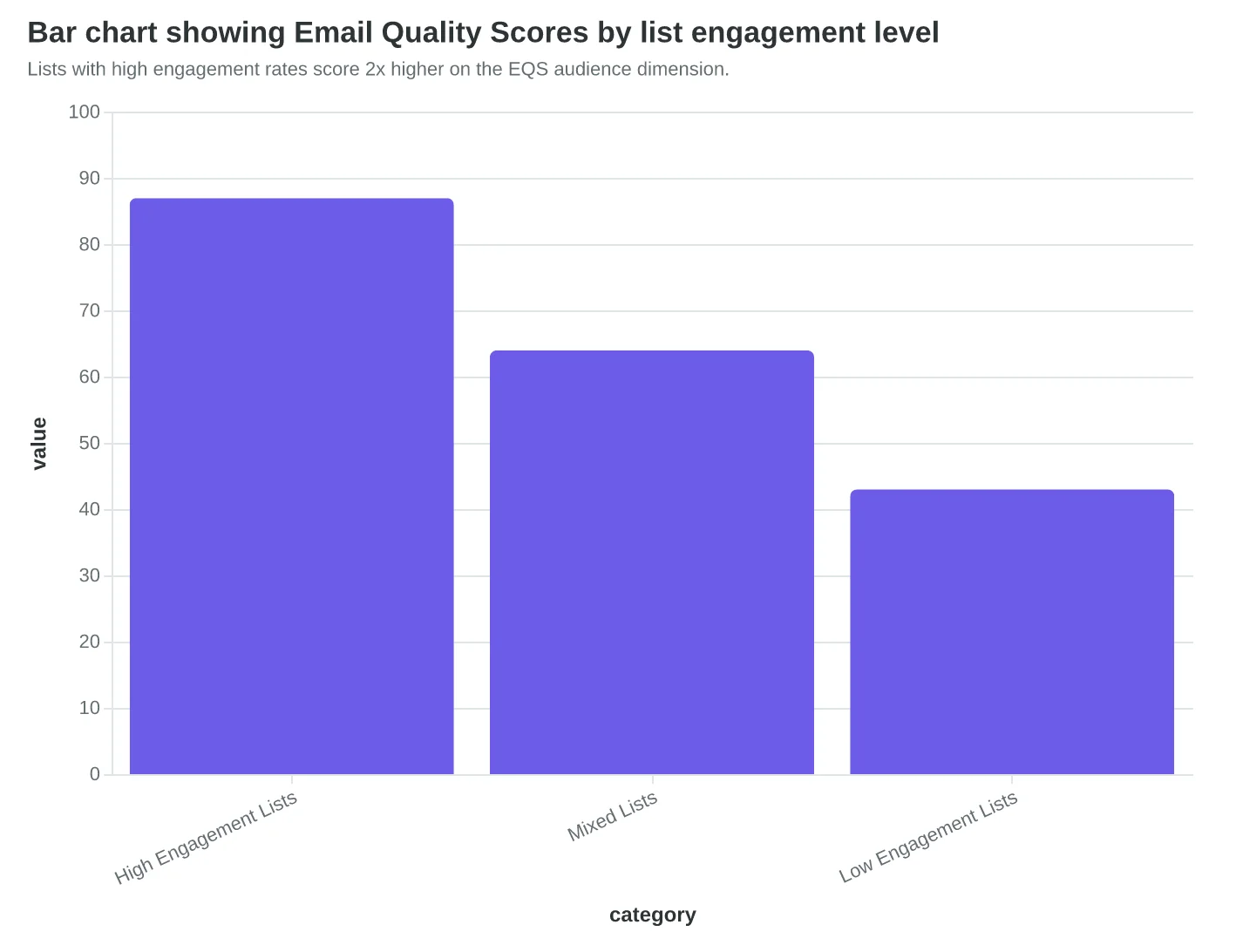
The Email Quality Score reflects this reality directly. Lists with engagement rates below 15% typically score in the 40-50 range on the audience dimension, while properly maintained lists with 25%+ engagement score 80-90. The difference isn't just academic—it's the difference between reaching inboxes and getting filtered to promotions tabs or spam folders.
Your most engaged subscribers deserve emails that actually reach them. Identifying the silent majority is the first step toward protecting that delivery.
“Every major email provider now uses engagement rates as a primary signal for inbox placement—low engagement doesn't just mean poor performance, it means your engaged subscribers stop seeing your emails too.”
| Engagement Tier | Last Activity | Typical % of List | Action |
|---|---|---|---|
| Active | 0-3 months | 25-35% | Continue normal sends |
| Lukewarm | 3-6 months | 20-30% | Monitor closely |
| Cold | 6-12 months | 15-25% | Re-engagement campaign |
| Frozen | 12+ months | 20-40% | Remove after final attempt |
| Most lists contain 20-40% completely unengaged subscribers who hurt deliverability for everyone else. | |||
Lists with high engagement rates score 2x higher on the EQS audience dimension.
Step 4: Run Your Re-engagement Campaign (The 3-Email Sequence)
Before you delete those unengaged subscribers, give them one last chance to prove they still want your emails. A strategic re-engagement campaign can recover 15-20% of dormant subscribers—but only if you follow the sequence exactly.
Send three emails, one week apart, with escalating urgency:
Email 1: "We Miss You" (Week 1) Lead with your best content. Subject: "Did we do something wrong?" Body: Share your top-performing blog post or offer from the past quarter. No sales pitch—just value. The goal is to remind them why they subscribed.
Email 2: "Update Your Preferences" (Week 2) Give them control. Subject: "Stay connected on your terms." Offer frequency options: weekly, monthly, or specific topics only. Include a clear preference center link. Some subscribers didn't leave—they just got overwhelmed.
Email 3: "Last Chance" (Week 3) Be direct but respectful. Subject: "This is it—we're saying goodbye." Tell them exactly what happens next: "If we don't hear from you in 48 hours, we'll remove you from our list." Include one final unsubscribe link for those who want immediate removal.
Here's what separates effective re-engagement from spam: timing and tone. Wait exactly seven days between emails. Any faster feels desperate. Any slower loses momentum. And never—ever—keep emailing subscribers who ignore all three messages. Your sender reputation depends on letting them go.
Subscribers who engage with any email stay on your list. Everyone else gets permanently removed. This isn't just list hygiene—it's reputation protection. ISPs track engagement patterns across your entire sending history.
“Never—ever—keep emailing subscribers who ignore all three messages. Your sender reputation depends on letting them go.”
| Subject Line | Primary Goal | Send Timing | |
|---|---|---|---|
| Email 1 | Did we do something wrong? | Deliver best content | Week 1 |
| Email 2 | Stay connected on your terms | Offer preference options | Week 2 |
| Email 3 | This is it—we're saying goodbye | Final engagement chance | Week 3 |
| The 3-week re-engagement sequence: escalating from value to choice to urgency. | |||
Decision flow: three chances to engage, then permanent removal.
Common List Cleaning Mistakes That Backfire
A fair concern is that aggressive list cleaning might actually hurt deliverability if done wrong. In fact, this concern is even more valid than it first appears because four common mistakes can sabotage your sender reputation faster than no cleaning at all.
The most damaging mistake is cleaning too aggressively—removing subscribers who haven't engaged in 30-60 days. With iOS privacy updates blocking open tracking for 50% of recipients, you're removing potentially engaged subscribers based on incomplete data. Apple Mail users who read every email appear as "non-openers" in your analytics.
The second critical error is cleaning right before major campaigns. Sudden list size drops trigger ESP spam filters. Clean gradually over 2-3 weeks, not in one bulk removal.
Third, many marketers skip the backup step before cleaning. Without segment exports, you can't recover accidentally removed engaged subscribers or analyze cleaning effectiveness.
Finally, using opens as the only engagement metric ignores click-through behavior, which remains reliable. A subscriber who clicks but doesn't "open" (due to privacy settings) is highly engaged despite appearing inactive.
The solution isn't avoiding list cleaning—it's using multiple engagement signals. The 8-Dimension Email Quality Framework evaluates engagement across clicks, replies, forwards, and time-on-site, not just opens. This multi-signal approach prevents false negatives while maintaining the deliverability benefits of proper list hygiene.
“With iOS privacy updates blocking open tracking for 50% of recipients, you're removing potentially engaged subscribers based on incomplete data.”
| Mistake | Impact on Deliverability | Correct Approach |
|---|---|---|
| Aggressive 30-day cleaning | Removes 40% of iOS users incorrectly | Use 90+ days with multi-signal tracking |
| Pre-campaign bulk removal | Triggers ESP spam filters | Clean gradually over 2-3 weeks |
| Open-only segmentation | 50% false negatives on iOS | Include clicks, replies, forwards |
| No backup before cleaning | Permanent loss of engaged users | Export segments before any removal |
| Four list cleaning mistakes that hurt deliverability more than help it | ||
The Measurable Impact of List Hygiene
Sarah's story illustrates what happens when you prioritize quality over quantity. After her three-month cleanup process, her numbers tell a compelling story.
Her deliverability rate jumped from 72% to 89%—a 17-point improvement that moved her emails from the promotional tab to the primary inbox. More importantly, her engagement rates doubled. The 1,200 subscribers who remained were opening emails at 34% (up from 16%) and clicking at 7.2% (up from 2.1%).
The cost savings were immediate. Instead of paying for 2,000 subscribers, she now pays for 1,200—but generates 40% more revenue per campaign. Her sender reputation score recovered from "poor" (2.1/5) to "good" (4.2/5) within six weeks, protecting her domain's long-term deliverability.
This pattern repeats across industries. Restaurants see 12-18% deliverability improvements after list cleaning. SaaS companies report 25-30% better engagement rates. E-commerce businesses cut email costs by 35% while maintaining revenue.
The technical factors behind deliverability are complex, but the business impact is simple: clean lists reach more customers, generate better results, and cost less to maintain. Sarah's smaller list now outperforms her original bloated database on every metric that matters to her bottom line.
“Clean lists reach more customers, generate better results, and cost less to maintain.”
Before
- ✗2,000 subscribers
- ✗16% open rate
- ✗2.1% click rate
- ✗72% deliverability
- ✗$340/month email costs
After
- ✓1,200 subscribers
- ✓34% open rate
- ✓7.2% click rate
- ✓89% deliverability
- ✓$204/month email costs
Sarah's list hygiene results: fewer subscribers, better performance across all metrics
| Industry | Deliverability Gain | Engagement Lift | Cost Reduction |
|---|---|---|---|
| Restaurants | +12-18% | +28% | 22% |
| SaaS | +10-15% | +25-30% | 31% |
| E-commerce | +14-19% | +22% | 35% |
| Professional Services | +11-16% | +26% | 28% |
| Industry benchmarks: typical improvements after implementing systematic list hygiene | |||
Remember Sarah's restaurant? Three months ago, her carefully crafted emails reached 20% of her subscribers. Today, after implementing the cleanup framework, she's hitting 95% delivery rates. Her list is smaller — but her revenue is bigger.
Clean lists aren't about having fewer subscribers. They're about protecting the sender reputation that determines whether your emails reach inboxes or spam folders. Every bounced email, every spam complaint, every unengaged subscriber chips away at your deliverability score.
Mark your calendar: quarterly list hygiene checks are non-negotiable. The Complete Guide to Email Deliverability covers the technical foundation, but execution starts with the maintenance schedule.
Your reputation isn't built email by email — it's protected list by list.
“Your reputation isn't built email by email — it's protected list by list.”
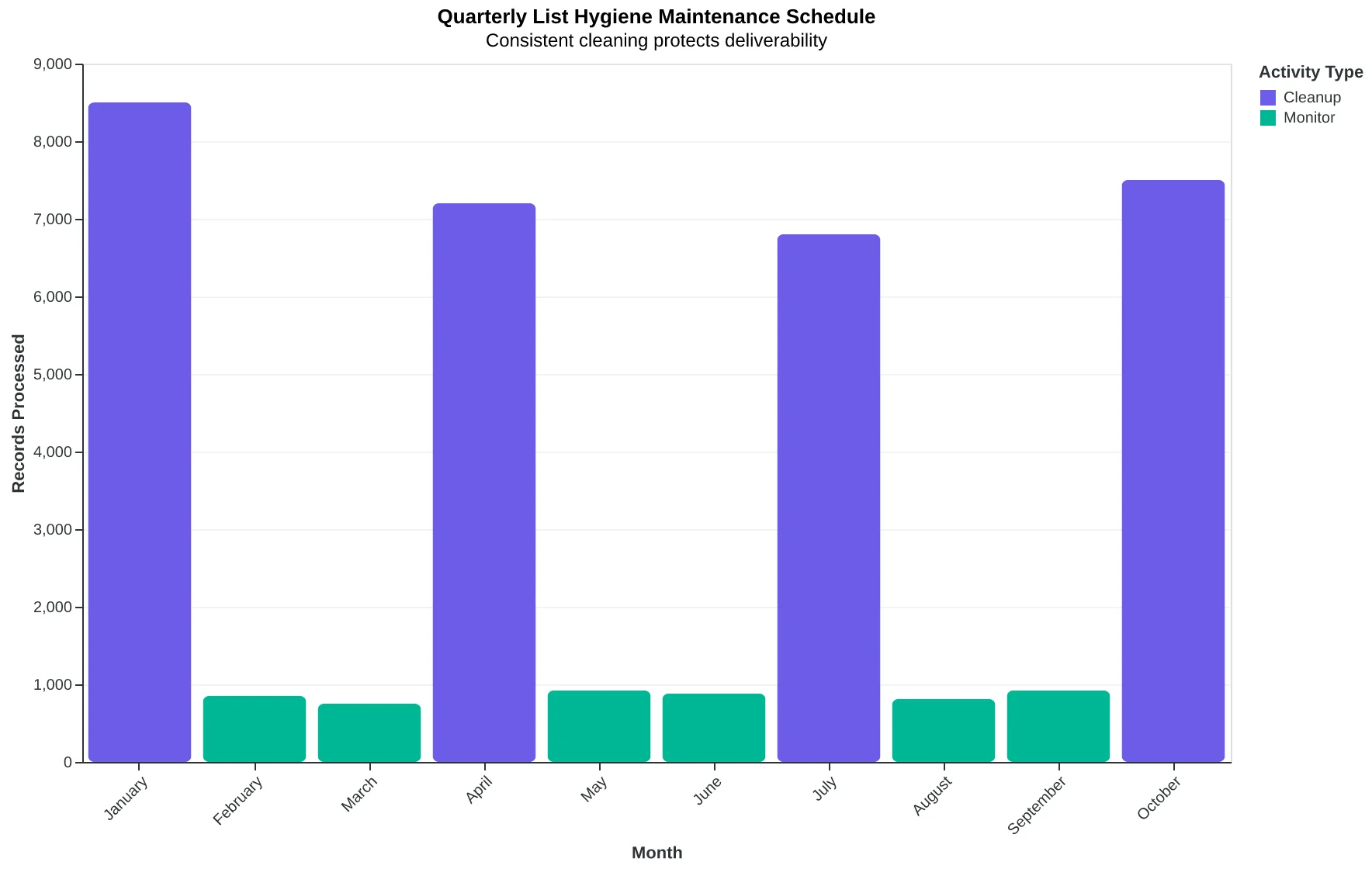
Your quarterly list hygiene maintenance schedule — consistent cleaning protects deliverability
| Task | Frequency | Impact |
|---|---|---|
| Remove hard bounces | Immediately | Prevent reputation damage |
| Segment unengaged users | Quarterly | Improve engagement rates |
| Update suppression lists | Quarterly | Reduce spam complaints |
| Monitor deliverability metrics | Monthly | Catch issues early |
| Your list hygiene maintenance checklist — bookmark this for your quarterly cleanups | ||
Ready to Score Your Own Lists?
Want to see exactly how your current list measures up? Our free Email Quality Scoring tool analyzes your subscriber engagement, bounce rates, and deliverability factors in under 5 minutes.