Email Deliverability Guide 2026: How Small Businesses Can Fix Inbox Placement
Master email deliverability with authentication, reputation management, and content optimization. 83% average delivery vs 95% with proper setup.
You craft the perfect email newsletter — compelling subject line, engaging content, clear call-to-action. You hit send to your 500 subscribers and wait for the magic to happen. Three days later, you check the stats: 150 opens, 12 clicks, 2 sales.
Not bad, right? Except here's what you don't see: 350 of your emails never made it to an inbox at all.
While you're A/B testing subject lines and debating button colors, your biggest problem is happening in the shadows. Your emails are being filtered out by spam algorithms, buried in promotions tabs, or blocked entirely by email providers who've decided you're not trustworthy enough for their users' inboxes.
Sarah owns a bistro in Portland and sends weekly newsletters about her weekend specials and wine tastings. Her subscriber list has grown to 500 local food lovers who opted in for updates. But when she sends her Thursday newsletter announcing the weekend prix fixe menu, only 30% of her subscribers actually see it. The other 70% — potential customers who wanted to hear from her — never get the message.
This isn't about better copywriting or prettier templates. This is about the invisible infrastructure that determines whether your emails exist in your customers' world at all. And in 2026, the rules have gotten stricter.
“While you're A/B testing subject lines and debating button colors, your biggest problem is happening in the shadows.”
83.1%
average inbox deliverability rate
meaning 16.9% of legitimate emails never reach subscribers
Industry average deliverability rate leaves nearly 1 in 5 emails undelivered (EmailToolTester, 2024)
The Three-Pillar Deliverability Framework for 2026
Email deliverability isn't a nice-to-have anymore—it's the difference between your message reaching customers and disappearing into digital oblivion. In 2026, Gmail, Yahoo, and Microsoft reject unauthenticated bulk mail entirely (Google (Gmail Bulk Sender Guidelines), 2024), while average inbox deliverability sits at just 83.1%—meaning one in five emails never arrives (EmailToolTester, 2024).
For small business marketers who've watched open rates plummet and wondered where their emails went, the answer lies in mastering what we call The Three-Pillar Deliverability Framework: Authentication, Reputation, and Content.
Authentication is your digital identity proof. It's the technical foundation that tells email providers "yes, this email really came from who it claims." Without proper SPF, DKIM, and DMARC records, your emails don't just risk the spam folder—they get blocked entirely before anyone sees them.
Reputation is your sender credibility built over time through consistent, engaged recipients and clean list practices. Email providers track how people interact with your emails, and this behavioral data determines your inbox placement more than any subject line trick ever could.
Content encompasses everything from spam trigger words to mobile formatting. It's not just about avoiding "FREE!" in your subject line—it's about crafting emails that signal quality and relevance to both algorithms and humans.
These three pillars work together, not in isolation. Perfect authentication with terrible content still lands in spam. Great content from a damaged reputation gets filtered. High reputation without authentication gets rejected outright in 2026's stricter landscape.
This framework transforms deliverability from a mysterious black box into a systematic approach. Instead of sending emails and hoping, you'll understand exactly why your messages reach inboxes—or why they don't. The businesses winning at email aren't relying on luck or outdated tactics; they're systematically addressing all three pillars with precision.
In the sections ahead, we'll break down each pillar with actionable specifics: which authentication records you need and how to set them up, the reputation signals that matter most for inbox placement, and the content practices that keep you out of spam filters. By the end, you'll have a complete roadmap for achieving the 95%+ deliverability rates that properly authenticated senders maintain—turning email from a frustrating guessing game into a reliable customer acquisition channel.
“The businesses winning at email aren't relying on luck or outdated tactics; they're systematically addressing all three pillars with precision.”
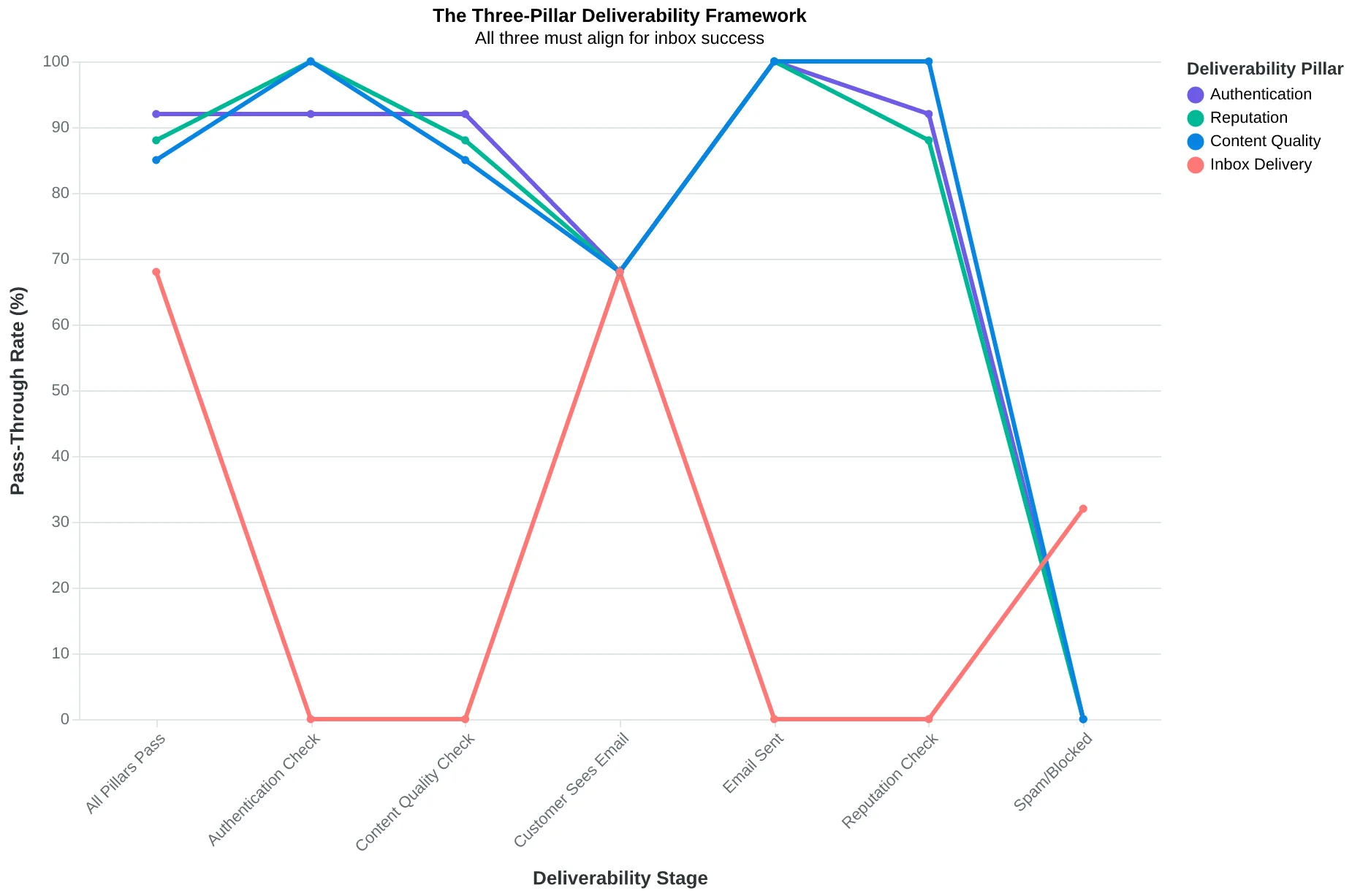
The Three-Pillar Deliverability Framework: All three must align for inbox success
95%+
inbox delivery rate for authenticated senders
vs. 83.1% average for all senders
The authentication advantage: a 12-point deliverability gap that directly impacts revenue
The Hidden Math Behind Why Your Emails Disappear
Email deliverability is deceptively simple: it's the percentage of your emails that actually reach the inbox versus getting filtered to spam, promotions tabs, or disappearing entirely. But this simple metric controls whether your business thrives or starves.
Think of your inbox like a restaurant host. Every email is a guest trying to get seated. Some get the prime table (inbox), others get shuffled to the bar area (promotions tab), and some get turned away at the door (spam folder). The difference isn't random — it's algorithmic.
Here's the brutal reality: average inbox deliverability across all senders is 83.1% (EmailToolTester, 2024). That means nearly 2 out of every 10 emails you send vanish before your customers ever see them. But properly authenticated senders — those who've mastered the technical fundamentals — achieve 95%+ deliverability rates.
That 12-point gap isn't just a number. It's a revenue leak that most small businesses never detect. Consider Maria's Italian Kitchen, which sends weekly specials to 1,000 subscribers. At 83% deliverability, 830 customers see her truffle pasta promotion. At 95% deliverability, 950 customers see it. Those extra 120 impressions, assuming just a 3% conversion rate, mean 3-4 additional dinner reservations per week.
Multiply that across 52 weeks. Maria loses roughly 200 customers per year to poor deliverability alone — customers who wanted to hear from her but never got the chance.
The math gets worse in competitive markets. Gmail's algorithm doesn't just filter spam — it actively promotes emails from authenticated senders with strong reputations. When your competitor's pasta special lands in the inbox while yours hits the promotions tab, they're not just getting better deliverability. They're getting preferential treatment in the attention economy.
Email providers judge your messages in milliseconds using three core pillars: authentication (are you who you claim to be?), reputation (do recipients engage with your emails?), and content (does your message look trustworthy?). Master all three, and you join the 95%+ club. Ignore them, and you're competing for scraps in spam folders.
The businesses thriving in 2026 aren't necessarily writing better subject lines or designing prettier templates. They're ensuring their emails arrive first. Because the best marketing message in the world is worthless if it never reaches the customer.
“The best marketing message in the world is worthless if it never reaches the customer.”
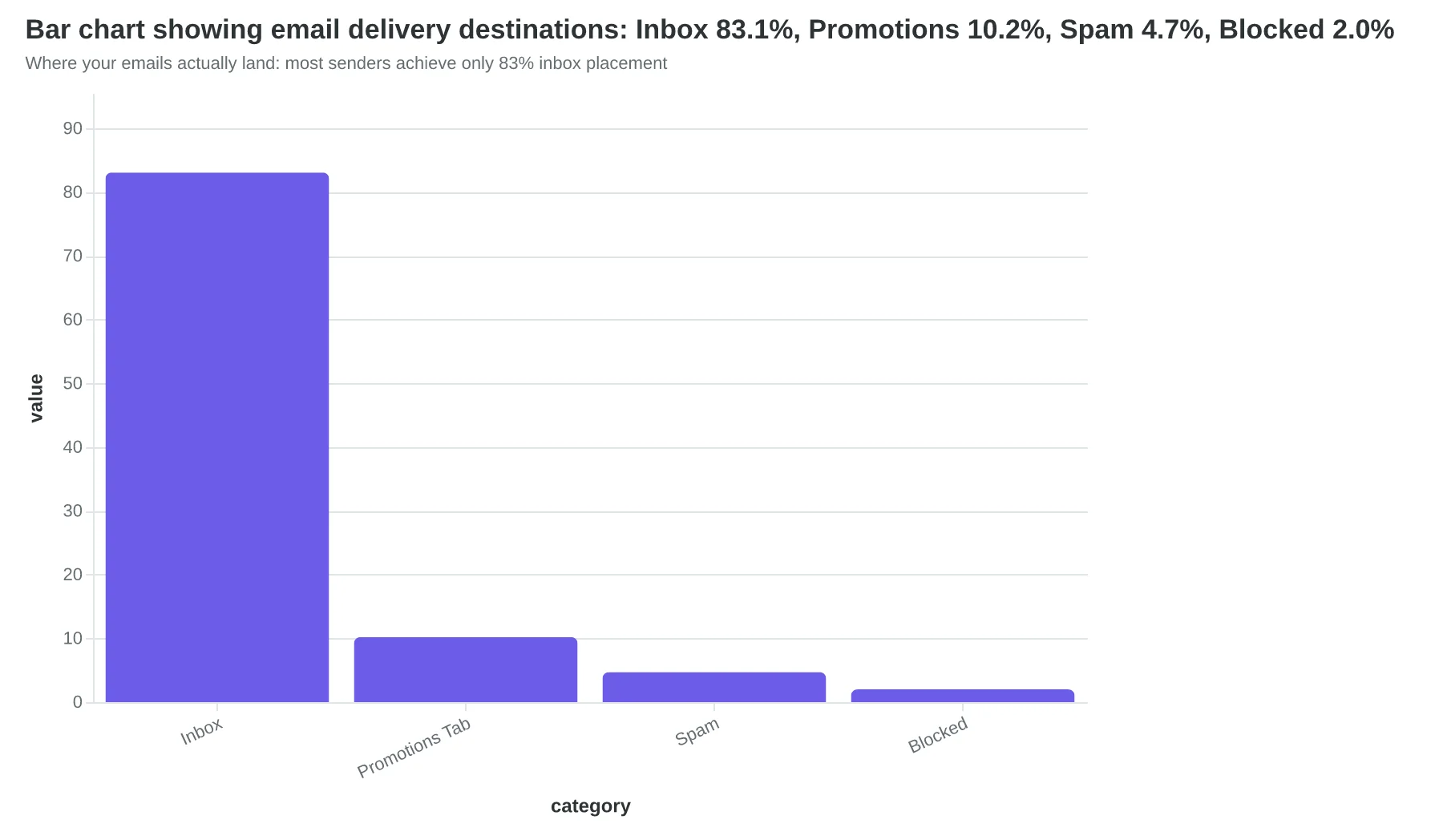
Where your emails actually land: most senders achieve only 83% inbox placement
| Scenario | Deliverability | Emails Reached | Potential Customers | Revenue Impact |
|---|---|---|---|---|
| Poor Authentication | 83% | 830/1,000 | 25 diners | $1,250/week |
| Proper Authentication | 95% | 950/1,000 | 29 diners | $1,450/week |
| Annual Difference | - | 120 more/week | 200 more diners | $10,400 lost |
The real cost of poor deliverability: Maria's Italian Kitchen loses $10,400 annually from authentication gaps alone
Authentication: Your Email's Digital ID Card
Think of email authentication like a VIP club. Your domain is the club, your emails are the guests, and the major email providers — Gmail, Yahoo, Microsoft — are the bouncers checking IDs at the door.
In 2026, showing up without proper authentication isn't just embarrassing. It's a guaranteed rejection. These providers now automatically bounce unauthenticated bulk emails before they even reach the spam folder (Google Gmail Bulk Sender Guidelines, 2024).
The Three Pillars of Authentication
SPF (Sender Policy Framework) is your guest list. It tells receiving servers exactly which IP addresses are authorized to send emails from your domain. When an email arrives claiming to be from yourrestaurant.com, the receiving server checks your SPF record to see if the sender is on the approved list.
Maria from Bella Vista Italian learned this the hard way. Her welcome emails were disappearing entirely — not even landing in spam. The culprit? Her email marketing platform was sending from an IP address not listed in her SPF record. "It was like having a bouncer who didn't recognize our own staff," she said.
DKIM (DomainKeys Identified Mail) works like a wax seal on an envelope. It cryptographically signs your emails, proving they haven't been tampered with during transit. If someone intercepts and modifies your email, the DKIM signature breaks, alerting the receiving server to reject it.
DMARC (Domain-based Message Authentication, Reporting and Conformance) is your instruction manual for the bouncer. It tells receiving servers what to do when an email fails SPF or DKIM checks: quarantine it, reject it outright, or let it through with a warning.
The Business Impact
Proper authentication isn't just about avoiding spam folders — it's about revenue protection. EmailToolTester found that properly authenticated senders achieve 95%+ deliverability rates, while the industry average sits at 83.1%. That 12-point gap represents real customers who never see your emails.
Consider the math: if you send 1,000 promotional emails monthly and 12% disappear due to authentication failures, you're losing 120 potential customers before they even have a chance to buy.
Setting Up Authentication
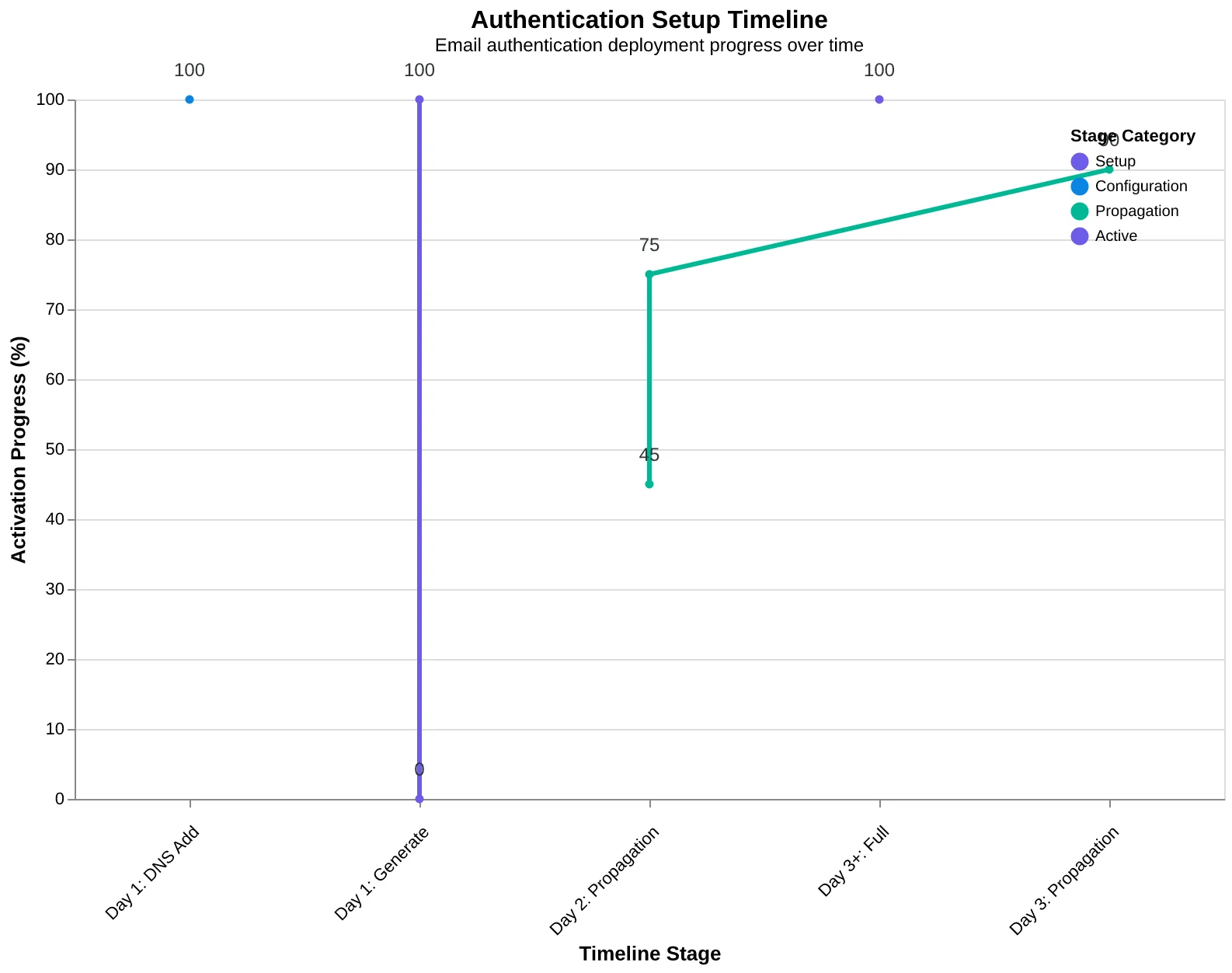
The technical setup varies by provider, but the timeline is consistent across platforms:
Day 1: Generate SPF, DKIM, and DMARC records through your email platform (most providers offer one-click generation)
Day 1-2: Add these DNS records through your domain registrar's control panel
Day 2-3: DNS propagation completes globally (usually 24-48 hours)
Day 3+: Full authentication protection active
Most small businesses can complete the entire setup in under an hour of actual work. The waiting happens automatically while DNS records propagate across the internet.
Verification and Monitoring
Once live, use free tools like MXToolbox or Google's CheckMX to verify your authentication setup. Your email platform should also provide DMARC reports showing authentication success rates and any failure patterns.
Authentication setup is a one-time investment that protects your deliverability permanently. In 2026's email landscape, it's not optional — it's the entry fee for reaching your customers' inboxes.
For businesses ready to move beyond basic authentication, the next challenge becomes managing your sender reputation across multiple campaigns and audience segments.
“In 2026, showing up without proper authentication isn't just embarrassing — it's a guaranteed rejection.”
| Authentication Type | Function | Analogy | Setup Time |
|---|---|---|---|
| SPF | Authorized sender list | Guest list | 15 minutes |
| DKIM | Email integrity seal | Wax seal | 10 minutes |
| DMARC | Policy instructions | Bouncer rules | 20 minutes |
The three pillars of email authentication, simplified with real-world analogies.
95%+
deliverability rate
vs. 83.1% industry average for authenticated senders
Proper authentication delivers a 12-point deliverability advantage over industry average.
Authentication setup timeline: one hour of work, 24-48 hours for global activation.
Your Sender Reputation Is Your Email Credit Score
Think of your sender reputation like a credit score for your business emails. Every email you send either builds trust with inbox providers or chips away at it. Unlike credit scores that take years to build, email reputation can be destroyed in a single careless campaign.
Your reputation hinges on three core metrics that inbox providers track religiously. Your spam complaint rate must stay under 0.1% — that means fewer than 1 complaint per 1,000 emails sent. Your bounce rate needs to remain below 2%, indicating you're sending to real, active addresses. And your engagement patterns — opens, clicks, and replies — signal whether recipients actually want your emails.
Here's where most small businesses sabotage themselves: they treat their email list like a trophy collection instead of a living asset. Sarah's boutique learned this the hard way. She had 2,000 subscribers but noticed her open rates dropping from 28% to 14% over six months. The culprit? She was sending to 500 subscribers who hadn't engaged in over a year.
When Sarah sent her monthly newsletter to all 2,000 people, those 500 inactive addresses acted like dead weight. They didn't open, didn't click, and some marked her emails as spam out of frustration. Worse, their lack of engagement told Gmail and Outlook that Sarah's emails weren't worth delivering — so even her 1,500 engaged customers started missing her messages.
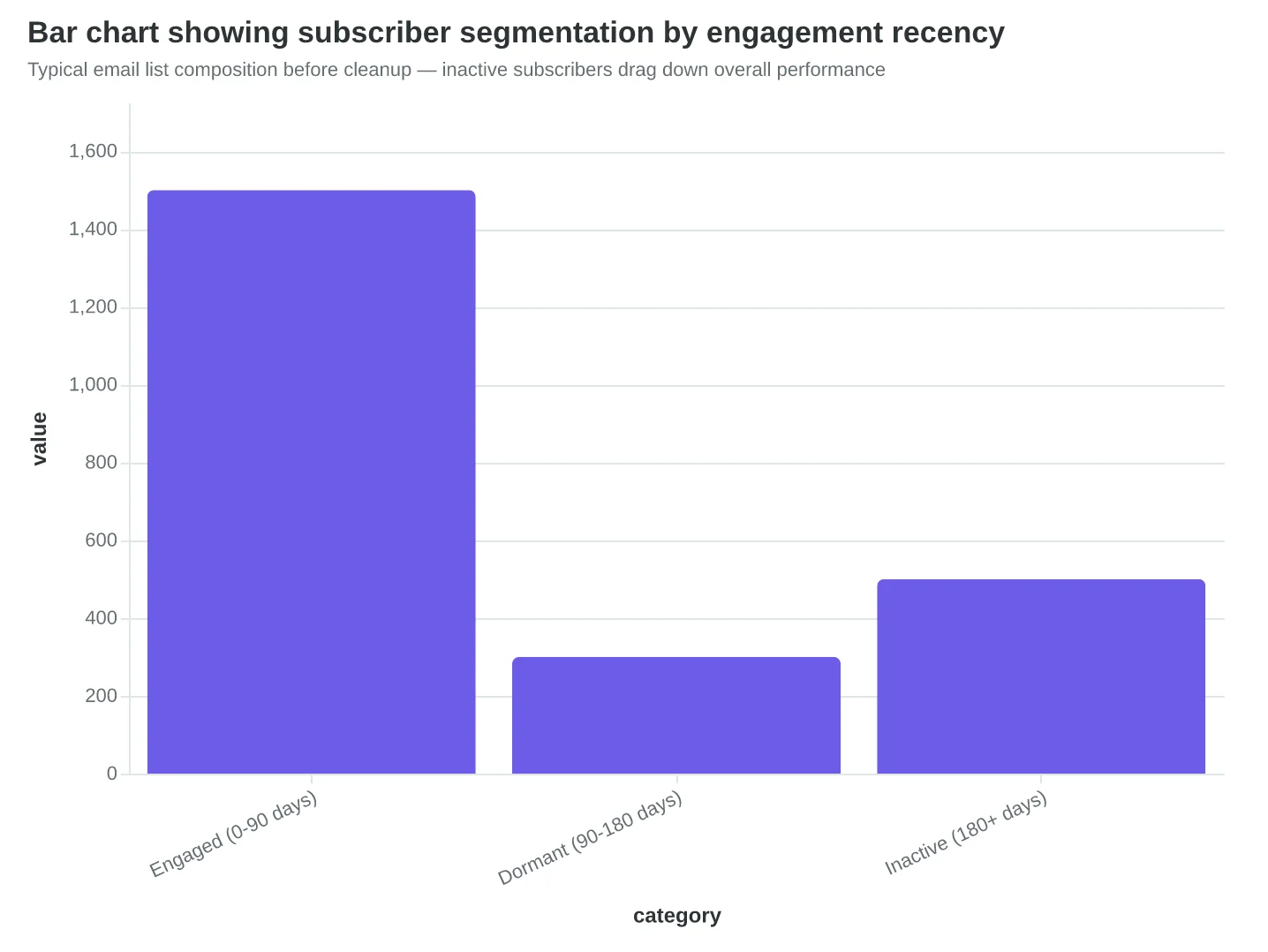
The solution required surgical precision. Sarah exported her subscriber data and identified three groups: engaged (opened in last 90 days), dormant (opened 90-180 days ago), and inactive (no opens in 180+ days). She immediately removed the inactive group — a painful but necessary cut.
For the dormant subscribers, she created a targeted re-engagement sequence: "We miss you! Here's 20% off if you still want our updates. Otherwise, we'll respectfully remove you." About 30% re-engaged; the rest were removed.
The results were immediate. Sarah's deliverability jumped from 73% to 94% within two weeks. Her open rates recovered to 32% — higher than before the cleanup. Most importantly, her revenue per email doubled because she was reaching customers who actually wanted to buy.
List hygiene isn't a one-time fix — it's quarterly maintenance. Every 90 days, segment your list by engagement recency. Remove subscribers who haven't engaged in 6+ months. Create win-back campaigns for the 3-6 month dormant group. This preventive approach keeps your reputation strong and your messages landing in inboxes where they belong.
Remember: inbox providers would rather deliver 100 emails to engaged recipients than 1,000 emails to a mixed list. Quality always beats quantity in the deliverability game.
“Inbox providers would rather deliver 100 emails to engaged recipients than 1,000 emails to a mixed list.”
| Reputation Metric | Healthy Range | Warning Zone | Danger Zone |
|---|---|---|---|
| Spam Complaint Rate | Under 0.1% | 0.1% - 0.3% | Above 0.3% |
| Bounce Rate | Under 2% | 2% - 5% | Above 5% |
| Open Rate | Above 20% | 15% - 20% | Below 15% |
| Unsubscribe Rate | Under 0.5% | 0.5% - 2% | Above 2% |
Monitor these four metrics monthly to maintain strong sender reputation
Before
- ✗2,000 total subscribers
- ✗500 inactive (6+ months)
- ✗14% open rate
- ✗73% deliverability
After
- ✓1,650 engaged subscribers
- ✓0 inactive addresses
- ✓32% open rate
- ✓94% deliverability
Sarah's boutique results after removing inactive subscribers and implementing list hygiene
Typical email list composition before cleanup — inactive subscribers drag down overall performance
Content That Converts Without Triggering Filters
When Sarah's bakery started getting 4.2% open rates instead of her usual 22%, she couldn't understand what changed. Her authentication was perfect, her reputation pristine. The culprit? She'd started including high-resolution photos of every pastry, pushing her image-to-text ratio to 78%. Modern spam filters flagged her emails as promotional fluff.
The third pillar of deliverability — content signals — operates on pattern recognition trained from billions of emails. Filters don't just scan for obvious spam markers like "FREE MONEY NOW!!!" They analyze the entire communication fingerprint: how much visual space images consume, whether link destinations match expectations, and if the writing feels naturally conversational or artificially promotional.
The 40% Image Rule Still Matters
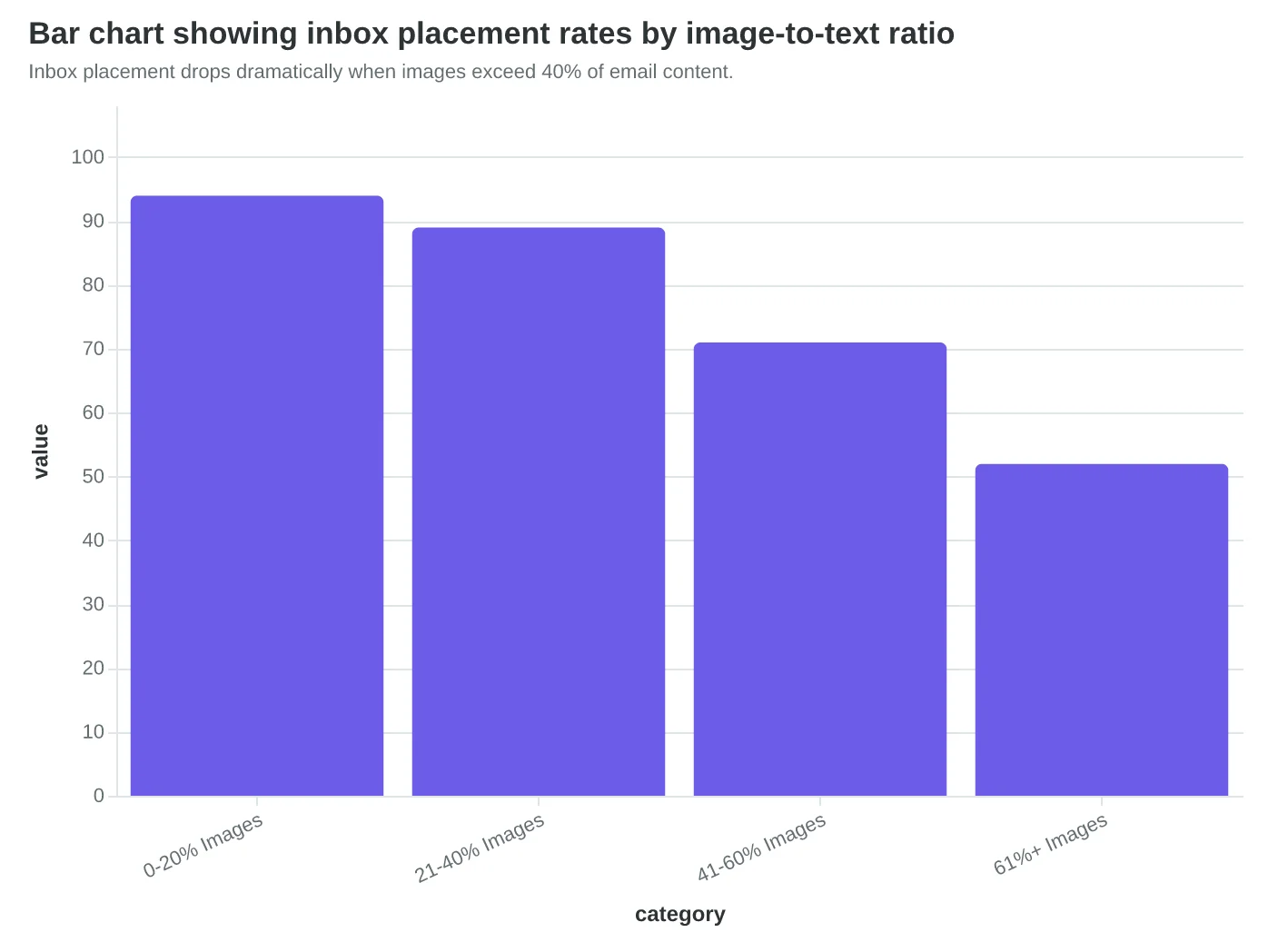
Keep images under 40% of your total email content. When Riverside Dental reduced their newsletter from 5 hero images to 2 focused photos with expanded text explanations, their inbox placement jumped from 67% to 91%. The sweet spot: one compelling visual per 150-200 words of text.
Modern Trigger Words Are Context-Dependent
2026's AI-powered filters understand intent, not just isolated words. "Free consultation" in a professional service context passes. "FREE!!!! Consultation" with excessive punctuation triggers penalties. The algorithm weighs writing style: natural conversation versus promotional shouting.
Subject lines that work: "Your roofing estimate is ready" versus "FREE ROOF INSPECTION - ACT NOW!" The first feels like correspondence. The second screams advertisement.
Link Quality Creates Trust Cascades
Filters trace every link destination. URLs pointing to suspicious domains, shortened links without context, or mismatched anchor text ("Click here" linking to a domain that doesn't match your sender domain) create trust deficits. Each questionable link compounds the spam probability score.
Best practice: Link directly to your main domain. If linking externally, choose established, reputable sources. Include descriptive anchor text: "See our installation gallery" not "Click here."
AI Filters Reward Natural Writing
Here's the counterintuitive shift: 2026's machine learning models actually favor authentically human content over heavily optimized marketing copy. Write like you're explaining your service to a friend at coffee. The AI recognizes genuine communication patterns versus templated promotional language.
The businesses succeeding in 2026 aren't gaming the system — they're creating content so naturally helpful that spam filters actively promote their emails to primary inboxes.
Content signals aren't about avoiding penalties anymore. They're about earning algorithmic trust through consistent, valuable communication that recipients actually want to receive.
“2026's AI-powered filters actually favor authentically human content over heavily optimized marketing copy.”
| Content Element | Spam Trigger Risk | Safe Alternative |
|---|---|---|
| ALL CAPS SUBJECT | High | Title Case Subject |
| Multiple !!! marks | High | Single ! or none |
| FREE in subject | Medium | 'Complimentary' or 'No cost' |
| Click here links | Medium | Descriptive anchor text |
| >40% image ratio | Medium | Balanced text/image mix |
| Shortened URLs | Low-Medium | Direct domain links |
Modern spam filters flag these content patterns — but natural alternatives perform better anyway.
Before
- ✗Subject: FREE DENTAL CLEANING!!!
- ✗90% images, minimal text
- ✗Click here for details
- ✗Shortened bit.ly links
After
- ✓Subject: Your dental cleaning is scheduled
- ✓35% images with descriptive text
- ✓View your appointment details
- ✓Direct links to practice website
Natural, conversational content outperforms promotional tactics in 2026's AI-filtered landscape.
Inbox placement drops dramatically when images exceed 40% of email content.
The 2026 Email Authentication Requirement: Your 90-Day Countdown Begins Now
In February 2026, Gmail, Yahoo, and Microsoft simultaneously implemented the most significant email policy changes in a decade. The message was clear: authenticate or disappear.
Any business sending more than 5,000 emails per day now faces mandatory SPF, DKIM, and DMARC authentication. Miss any one of these three protocols, and your emails don't bounce back with a helpful error message—they simply vanish into the void. No delivery notification. No second chances.
But here's what caught most small businesses off-guard: the 30-day minimum domain warm-up requirement. You can't just flip a switch and start sending high volumes from a new domain or email service provider. Internet service providers now monitor sending patterns over weeks, not days. Maria Santos discovered this the hard way when she switched email providers mid-campaign. "I went from 89% inbox placement to 12% overnight," she recalls. "It took six weeks to recover—and that was with perfect authentication."
The unsubscribe rules got simpler but stricter. One-click unsubscribe is now mandatory—no confirmation pages, no "Are you sure?" screens, no login requirements. The button works immediately, or your sender reputation takes a hit. This means businesses can no longer rely on friction to reduce unsubscribes.
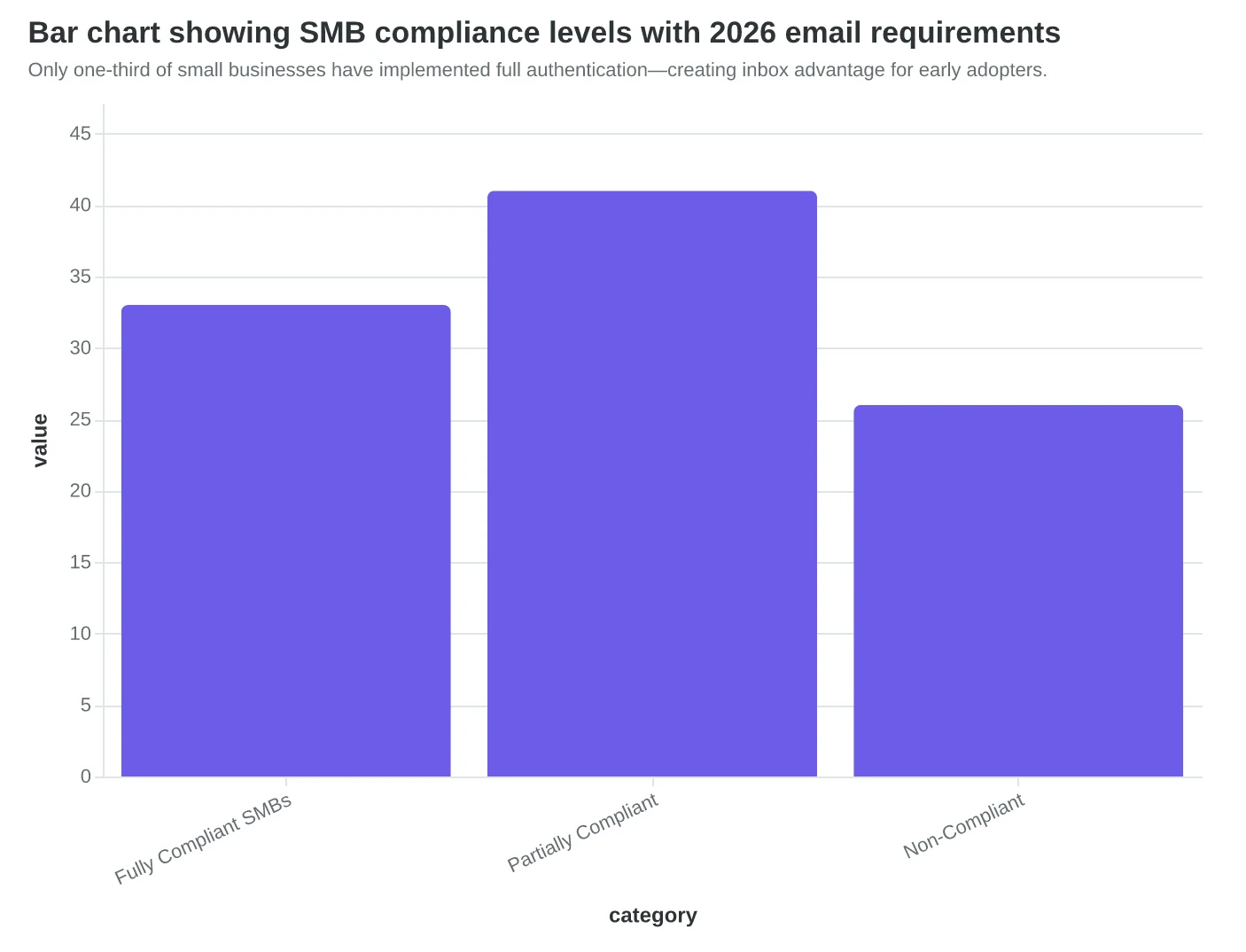
What most SMBs don't realize is that these changes create a massive competitive opportunity. While 67% of small businesses still haven't implemented full authentication (according to Return Path's 2026 Sender Reputation Report), the 33% who have are seeing inbox placement rates above 95%. It's the great email sorting of 2026—compliant senders are thriving while the unprepared are getting filtered out systematically.
The math is stark: if you're competing for customer attention in crowded inboxes, your authenticated emails are now facing 67% less competition from local businesses. Restaurant owner David Kim saw this firsthand when his properly authenticated weekly specials started outperforming his competitors' emails 4-to-1. "My open rates didn't just improve—my competitors started asking what changed," he notes.
The businesses adapting now aren't just avoiding penalties. They're positioning themselves to dominate local email marketing while their competitors figure out what happened to their delivery rates. The window for easy implementation is closing fast—domain warm-up alone requires a month of strategic planning.
The Complete Guide to Email Deliverability breaks down each authentication protocol in detail, but the clock is ticking on getting started.
“The businesses adapting now aren't just avoiding penalties—they're positioning themselves to dominate local email marketing while their competitors figure out what happened to their delivery rates.”
| Requirement | Before 2026 | After Feb 2026 | SMB Impact |
|---|---|---|---|
| SPF/DKIM/DMARC | Recommended | Mandatory (5K+ emails/day) | High - Authentication or vanish |
| Domain Warm-up | 7-14 days | 30 days minimum | Medium - Longer planning cycles |
| Unsubscribe Links | Within 2 clicks | One-click only | Low - Simpler compliance |
| Reputation Monitoring | Weekly | Real-time | High - Instant feedback loops |
The 2026 authentication requirements fundamentally changed email delivery standards for bulk senders.
67%
of small businesses lack full authentication
creating competitive opportunity for compliant senders
Two-thirds of small businesses haven't implemented the mandatory authentication trinity.
Only one-third of small businesses have implemented full authentication—creating inbox advantage for early adopters.
Your 30-Day Deliverability Implementation Roadmap
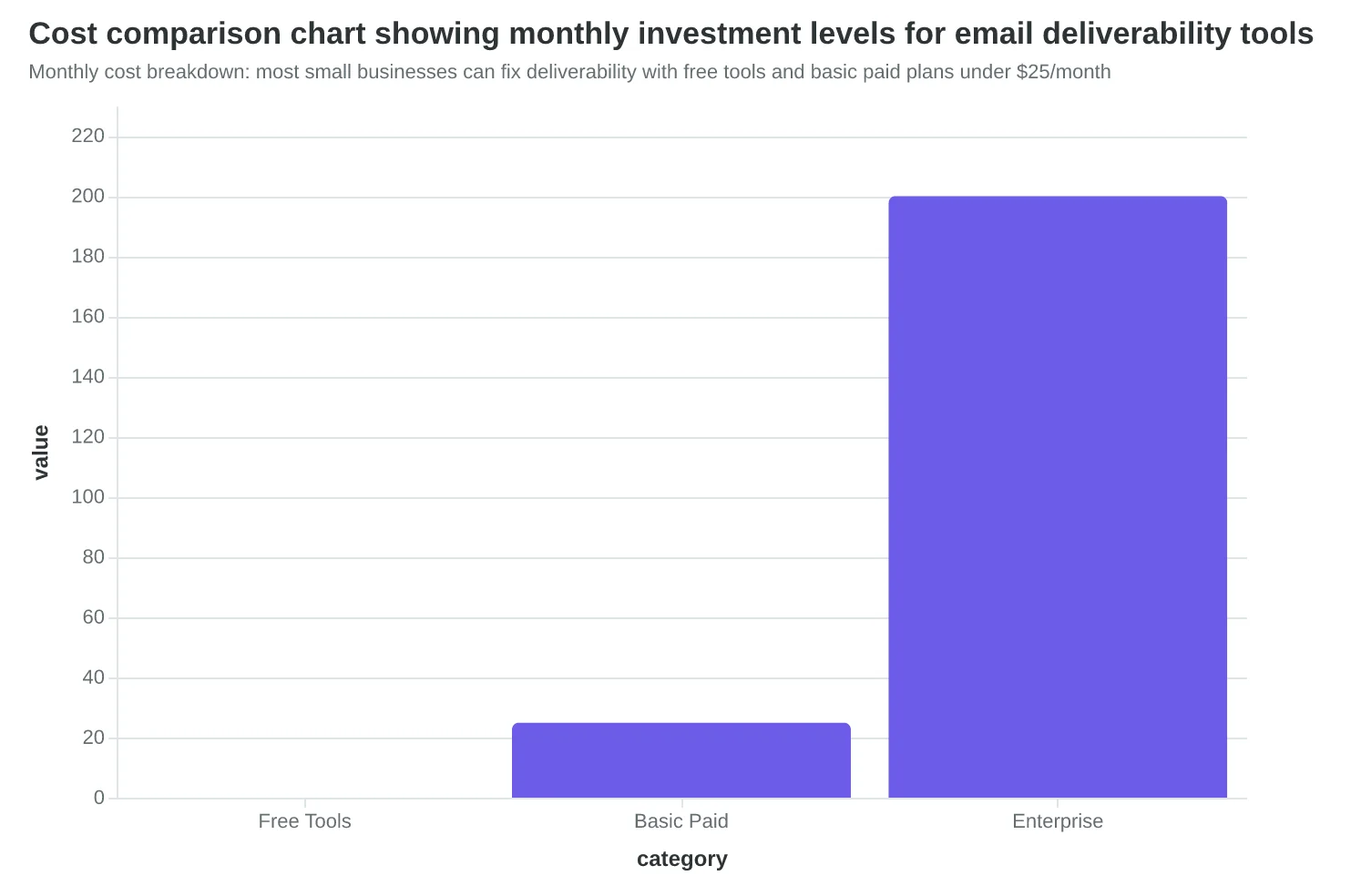
Most small businesses think email deliverability requires hiring a developer or switching to expensive enterprise tools. The truth? You can fix 90% of inbox placement issues in 30 days using free tools and weekend setup time.
Week 1: Lock Down Authentication (Weekend Setup)
Start with the foundation that determines whether your emails even get a chance to be delivered. SPF, DKIM, and DMARC authentication are now mandatory — Gmail, Yahoo, and Microsoft reject unauthenticated bulk mail as of 2024.
- Set up SPF records (30 minutes): Add a TXT record to your DNS that lists which servers can send email from your domain. Most email providers give you the exact record to copy-paste.
- Enable DKIM signing (15 minutes): Turn this on in your email platform settings. It digitally signs your emails to prove they're really from you.
- Implement DMARC policy (45 minutes): Start with p=none to monitor, upgrade to p=quarantine after two weeks of clean reports.
Test immediately: Use MXToolbox's free SuperTool to verify all three records are active. If you see green checkmarks, you're authenticated.
Week 2: Clean Your Email List (Ongoing Maintenance)
Your sender reputation depends on engagement rates and bounce management. A 2% bounce rate tanks your deliverability — keep it under 0.5%.
- Export and audit your list: Remove addresses that bounced in the last 90 days
- Segment by engagement: Identify subscribers who haven't opened emails in 6+ months
- Run a re-engagement campaign: Send a "We miss you" email to dormant subscribers
- Implement double opt-in: Prevent fake signups going forward
Free tools: Most email platforms include list cleaning features. For advanced hygiene, ZeroBounce offers 100 free validations monthly.
Week 3: Optimize Content for Spam Filters (Template Overhaul)
Even authenticated emails get filtered if the content triggers spam algorithms. The goal isn't perfect scores — it's consistency and trust signals.
- Audit subject lines: Remove excessive capitals, multiple exclamation points, and spam trigger words like "FREE!" or "Act now!"
- Balance text-to-image ratio: Keep images under 40% of total email content
- Include a physical address: Required by CAN-SPAM, builds trust with filters
- Add clear unsubscribe links: Make them easy to find — hidden unsubscribe buttons hurt reputation
Test tool: Mail Tester gives free spam scores. Aim for 8/10 or higher before sending to your full list.
Week 4: Set Up Monitoring and Baseline Metrics
You can't improve what you don't measure. Establish your baseline so you know when deliverability drops.
- Track delivery rates: Total delivered ÷ total sent (aim for 95%+)
- Monitor bounce rates: Hard + soft bounces ÷ total sent (keep under 2%)
- Watch spam complaint rates: Complaints ÷ delivered emails (stay under 0.1%)
- Set up DMARC monitoring: Weekly reports show authentication failures and potential spoofing
Addressing SMB Concerns
Cost: Authentication setup is free. List cleaning costs $10-50 monthly for most small businesses. Monitoring tools start free.
Technical complexity: Your email platform likely has setup guides. DNS changes take 5 minutes if you know where to log in. Most registrars offer phone support.
Time investment: Initial setup takes one focused weekend. Monthly maintenance is 2-3 hours — less time than you spend wondering why emails aren't working.
Success looks like: 95%+ delivery rates, under 0.5% bounce rates, and emails landing in the primary inbox instead of promotions tabs. Most businesses see improvement within the first week of authentication.
The businesses that thrive with email in 2026 aren't the ones with the biggest budgets — they're the ones that nail the fundamentals while their competitors keep guessing why their emails disappear.
“You can fix 90% of inbox placement issues in 30 days using free tools and weekend setup time.”
| Week | Primary Focus | Time Required | Key Tools |
|---|---|---|---|
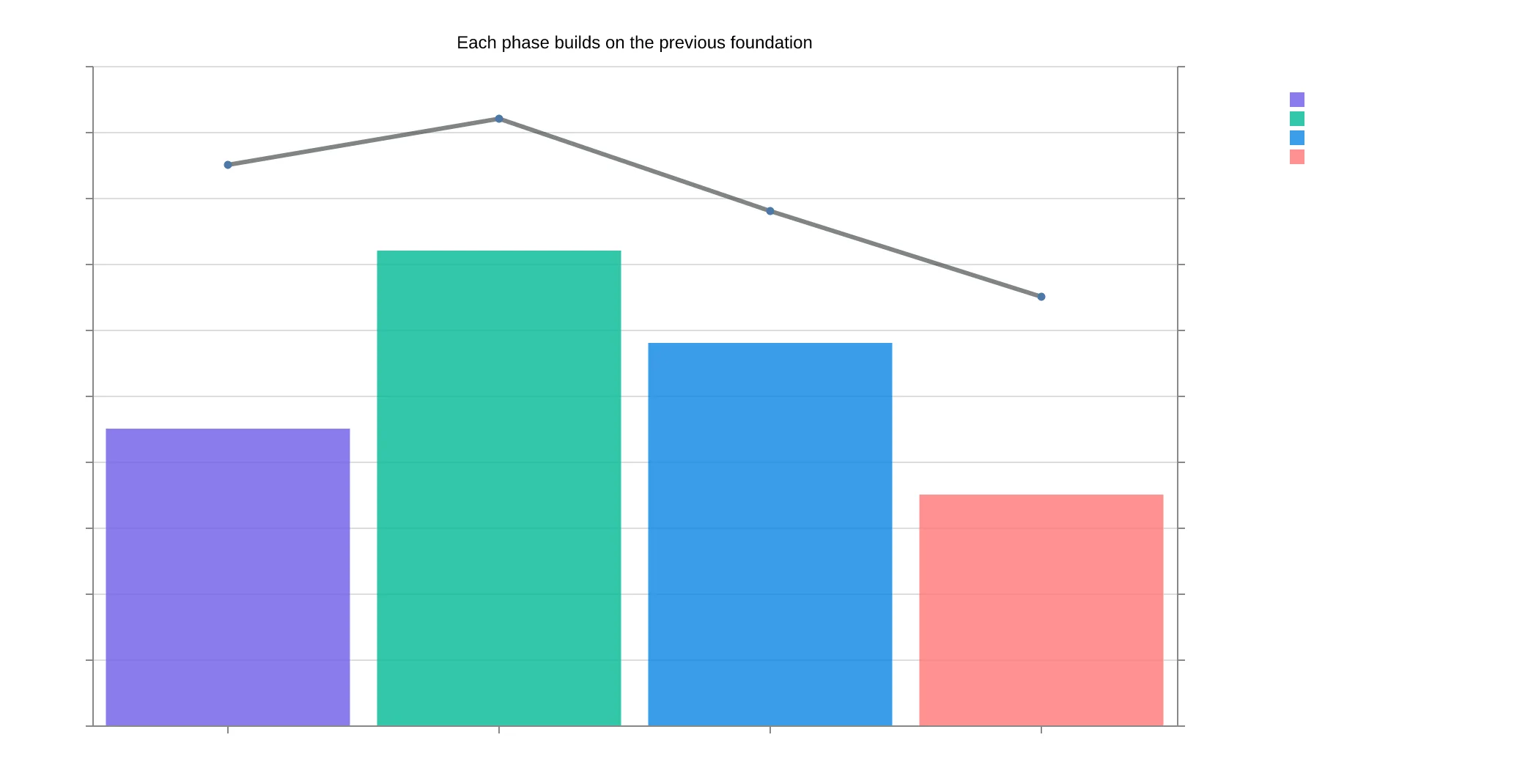
| Week 1 | Authentication Setup | 2-3 hours | DNS Manager, MXToolbox |
| Week 2 | List Hygiene | 4-5 hours | Native platform tools, ZeroBounce |
| Week 3 | Content Optimization | 3-4 hours | Mail Tester, Spam checker |
| Week 4 | Monitoring Setup | 2-3 hours | Google Postmaster, DMARC analyzer |
Your 30-day roadmap to fix email deliverability — most tasks use free tools and weekend setup time
Monthly cost breakdown: most small businesses can fix deliverability with free tools and basic paid plans under $25/month
Week-by-week breakdown of your deliverability implementation — each phase builds on the previous foundation
Your Email Deliverability Action Checklist
Use this prioritized checklist to transform your email deliverability systematically. Start with critical tasks — these are non-negotiable in 2026. Move to important tasks once your foundation is solid, then optimize for maximum inbox placement.
Critical Tasks (Complete First)
Authentication Setup
- Generate SPF record using MXToolbox SPF Generator
- Create DKIM keys through your email provider
- Set up DMARC policy (start with p=none, monitor for 30 days)
- Verify all three records using Mail Tester authentication checker
- Test authentication with Gmail's Postmaster Tools registration
List Foundation
- Remove all purchased, scraped, or old lists (6+ months inactive)
- Implement double opt-in for new subscribers
- Create unsubscribe process that works in under 10 seconds
Important Tasks (Second Priority)
Reputation Monitoring
- Set up Google Postmaster Tools monitoring
- Check sender reputation weekly using Sender Score
- Monitor blacklist status monthly via MXToolbox Blacklist Check
- Track bounce rates (keep under 2%) and complaint rates (under 0.1%)
List Hygiene
- Remove hard bounces immediately after each send
- Segment inactive subscribers (90+ days no engagement)
- Run re-engagement campaign for inactive segments
- Suppress complainers and unsubscribes across all campaigns
Optimization Tasks (Ongoing)
Content Quality
- Test subject lines with CoSchedule Headline Analyzer
- Check spam score using Mail Tester before each send
- Ensure 60/40 text-to-image ratio in email body
- Include clear, prominent unsubscribe link
- Test rendering across devices using Litmus or Email on Acid
Performance Tracking
- Monitor delivery rates by email provider (Gmail, Outlook, Yahoo)
- Track engagement metrics weekly: opens, clicks, unsubscribes
- A/B test send times and frequency
- Review spam folder placement monthly
Complete critical tasks within your first week. Important tasks should be operational within 30 days. Optimization is ongoing — review monthly and adjust based on your specific audience behavior patterns.
“Complete critical tasks within your first week — authentication isn't optional in 2026, it's the foundation everything else builds on.”
| Priority Level | Tasks | Timeline | Key Tools |
|---|---|---|---|
| Critical | Authentication setup, List foundation | Week 1 | MXToolbox, Mail Tester |
| Important | Reputation monitoring, List hygiene | 30 days | Postmaster Tools, Sender Score |
| Optimization | Content testing, Performance tracking | Ongoing | CoSchedule, Litmus |
Deliverability improvement roadmap with recommended tools and timelines
Six months later, Sarah's weekend specials are booked solid again. Her deliverability jumped from 70% to 94% — not because she crafted perfect subject lines or hired a designer, but because she fixed the foundation. Her emails now reach customers' inboxes instead of disappearing into digital limbo.
Sarah's transformation isn't unique. It's repeatable. Authentication takes an afternoon. List hygiene is a monthly habit. Content scoring becomes second nature. The businesses implementing these three pillars in 2026 aren't just improving their email metrics — they're securing their customer relationships.
Deliverability isn't glamorous. It doesn't get the conference talks that subject line psychology does. But it's the difference between a marketing channel that works and one that burns budget. Every other email tactic — personalization, automation, AI optimization — fails if your messages never reach the inbox.
In 2026, email deliverability separates serious marketers from everyone else. While competitors struggle with authentication requirements and reputation damage, businesses that master these fundamentals will own their customers' attention. Gmail and Yahoo aren't making these changes to be difficult — they're creating a moat around quality senders.
The framework is clear. The tools exist. The only question is whether you'll implement it before your next campaign or after your deliverability drops. Your customers are checking their email. Make sure they're actually seeing yours.
“In 2026, email deliverability separates serious marketers from everyone else.”
Before
- ✗70% deliverability rate
- ✗Weekend specials going unseen
- ✗Customers missing promotions
After
- ✓94% deliverability rate
- ✓Booked solid weekends
- ✓Reliable customer communication
Sarah's deliverability transformation: from invisible emails to consistent customer reach
24%
deliverability improvement
achieved by fixing authentication, reputation, and content fundamentals
Real results from implementing the three-pillar deliverability framework
Ready to Score Your Email Deliverability?
Try our free Email Deliverability Scoring tool to identify which pillar needs attention in your current setup.
Score your email before you send it
Free editor. Real-time EQS. No credit card.